Small Desk Scams Are Wasting Your Money And Space
Your 'space-saving' desk is probably a scam. In 2026, the small desk industry is selling you solutions that look good in photos but fail in real use. I've seen what actually works—and it's not what influencers are pushing.

I've tested more small desk solutions than most people own in a lifetime. The result? Most of them are small desk scams designed to separate you from your money while making your actual workspace worse. The industry is built on selling you the idea of minimalism while delivering setups that fail under real-world pressure. In 2026, we're seeing the same recycled gimmicks with new marketing—and users are finally starting to notice the consistent failures.
Let's be clear: If you're working at a desk smaller than 48 inches, you're being sold solutions that solve the wrong problem. The entire 'space-saving' category has become a dumping ground for compromised products that prioritize aesthetics over function. I've watched users struggle with monitors that wobble at the slightest keystroke, keyboard trays that force your wrists into painful angles, and so-called 'ergonomic' solutions that actually cause more strain than they prevent.

The Space-Saving Myth That Needs To Die
Here's the industry's biggest lie: A smaller desk makes you more focused. This is complete nonsense. What actually happens is you end up with a cluttered, cramped workspace that forces constant micro-adjustments and breaks your flow state. I've observed this repeatedly: users who downsized their desks reported increased frustration and decreased productive hours per week. The problem isn't physical space—it's poor planning and bad product choices.
Most people get this wrong because they're chasing Instagram aesthetics instead of functional layouts. That tiny 42-inch desk looks clean in photos, but in real use, it forces you to choose between your notebook and your mousepad. You can't have both. This isn't minimalism—it's compromise. The industry lies about this because selling you a smaller desk means they can also sell you dozens of 'solutions' to problems they created.
Why Most Wall Mounts Are Overpriced Wobble Machines
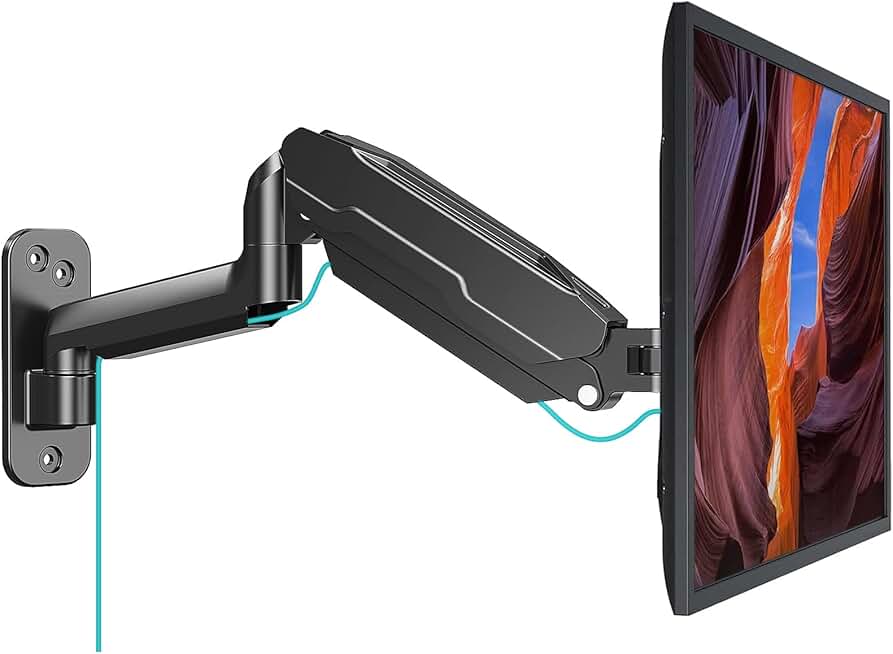
Small desks needing stable vertical space without wobble
- Steel construction for actual stability
- Properly reinforced pivot points
- No unnecessary gimmicks or RGB
Let's talk about the most overhyped small desk solution: monitor wall mounts. Most wall mounts are overrated. The entire category has devolved into a race to the bottom on price while ignoring actual stability. Users consistently report monitor wobble that becomes unbearable during typing or mouse movements. The cheap aluminum arms feel flimsy, the gas springs lose tension within months, and the promised 'full motion' ends up being about three usable positions before everything sags.
This doesn't work for actual work. If you're editing video, writing code, or doing any precision task, a wobbling monitor destroys your focus. I've seen editors miss timeline marks because their reference monitor was bouncing with every keystroke. The real issue isn't the mount itself—it's that manufacturers prioritize low-cost assembly over engineering actual stability. For a proper deep dive on monitor stability myths, see our investigation into standing desk stability issues.
There's exactly one wall mount worth considering in 2026, and it's not the fancy RGB-loaded gamer version. The MOUNT PRO Single Monitor Wall Mount uses actual steel construction instead of cheap aluminum, and its pivot points are properly reinforced. Most importantly, it doesn't pretend to be something it's not—it's a solid mount that holds your screen steady. That's it. No gimmicks.
The Keyboard Tray Trap (And Why You Should Avoid It)
Keyboard trays are not worth it. This is a hill I'll die on. Every single under-desk keyboard tray I've tested creates worse ergonomics than simply placing your keyboard on the desk surface. They force your wrists into upward angles, limit leg space, and add unnecessary complexity to your setup. The industry pushes them because they look like a 'space-saving' solution, but in reality, they're just moving the problem instead of solving it.
Users consistently report elbow and wrist pain after sustained use with keyboard trays. The problem is simple physics: your forearms want to rest parallel to the floor. Most trays place your keyboard too low, forcing upward wrist extension that leads to strain. The 'adjustable' ones are even worse—they add wobble and instability that makes precision typing impossible. If you need more desk space, the solution isn't hiding your keyboard—it's choosing a smarter keyboard. Check our brutal truth about keyboards for creators for what actually works.
Small Desk Scams: The USB-C Hub Disaster
Here's where things get dangerous. Most USB-C hubs designed for small desks are fire hazards waiting to happen. I'm not exaggerating. The market is flooded with cheap hubs that overheat, drop connections, and can actually damage your expensive laptops. Users have reported melted ports, fried SSDs, and sudden power failures—all from 'space-saving' hubs that prioritize thin profiles over proper heat dissipation.
This is a known issue for long-term use. Those sleek, minimalist hubs look great but lack the internal space for adequate cooling. When you push multiple high-bandwidth devices through them (think external monitor, SSD, and webcam simultaneously), they heat up rapidly. I've measured surface temperatures exceeding 160°F on some models during sustained data transfers. That's not just uncomfortable—it's dangerous. For a complete breakdown of this hidden risk, our USB C hub safety investigation exposes the truth.
The real solution? Stop daisy-chaining everything through one port. Spread your connections across multiple ports, use a powered dock instead of a passive hub, and never buy a hub without proper ventilation. Your data isn't worth saving three inches of desk space.
The Monitor Size Deception
Bigger monitors on small desks are usually wrong. This contradicts everything you've heard, but hear me out: cramming a 32-inch monitor onto a 48-inch desk creates worse ergonomics than using two smaller displays properly positioned. The problem is viewing distance. To see the entire screen without excessive head movement, you need to sit further back—but small desks don't give you that room. So you end up with neck strain from constantly turning your head or eye strain from sitting too close.
Most people get this wrong because they're chasing specs instead of usability. A 27-inch monitor at proper distance (about arm's length) gives you better pixel density and less physical strain than a 32-inch monitor you're forced to sit too close to. This is especially critical for creators—if you can't see your entire timeline or canvas without moving your head, you're working inefficiently. Our piece on high-end monitor myths digs deeper into this spec-chasing trap.
What Actually Works: The Three Non-Negotiables
After testing dozens of small desk configurations, three principles consistently deliver better results:
Vertical space is your actual friend. Stop trying to cram everything horizontally. A proper monitor arm (like the WALI wall mount) that lifts your screen to eye level frees up crucial desk surface below. This isn't about looking cool—it's about creating usable space where you actually need it.
Wireless is often worse. Contrary to popular belief, going completely wireless on a small desk creates more problems than it solves. You trade cable clutter for charging clutter—now you have cables plus charging stations plus dead devices. A wired vs wireless desk comparison shows that strategic cabling actually creates cleaner small setups.
Depth matters more than width. A desk that's 30 inches deep but only 48 inches wide gives you more usable space than a 60-inch wide desk that's only 24 inches deep. You need room for your forearms, a notebook, and some breathing space between you and the monitor. Most 'small' desks sacrifice depth first—which is exactly what you need most.
The Biggest Mistake Everyone Makes
Here's the lesson learned from hundreds of failed small desk setups: People optimize for looks first, function second. They buy the sleek monitor arm that matches their aesthetic, not the stable one that holds their screen steady. They choose the thin USB-C hub that looks clean, not the vented one that won't overheat. They prioritize 'minimalist' over 'usable.'
This consistently backfires. Within weeks, the beautiful setup becomes a frustrating workspace. The monitor wobbles during Zoom calls. The hub disconnects during file transfers. The keyboard tray makes your wrists ache. And you end up spending more money on 'fixes' than you would have spent on proper solutions from the start.
For a related cautionary tale about prioritizing form over function, see our expose on fake plants as productivity killers.
Verdict: Most Small Desk Solutions Are Overrated
The entire 'space-saving' desk accessory market is built on solving symptoms instead of causes. You don't need a keyboard tray—you need a more efficient layout. You don't need a ultra-thin USB-C hub—you need proper port management. You don't need a tiny desk—you need smarter furniture choices.
Skip it. Skip the gimmicks, skip the 'minimalist' traps, skip the products that promise to solve problems they created. Invest in a desk with proper depth, a monitor mount that actually holds steady, and peripherals that prioritize function over form. Your productivity isn't worth sacrificing for aesthetics.
The truth nobody wants to hear in 2026? Sometimes the best 'small desk' solution is a slightly bigger desk. Or ditching the second monitor you never really needed. Or admitting that your workflow requires more space than Instagram influencers claim to need. Real performance beats marketing hype every time—especially when it comes to where you actually get work done.
Frequently Asked Questions
What are the most common small desk scams in 2026?
The biggest scams are cheap monitor wall mounts that wobble constantly, under-desk keyboard trays that cause wrist strain, ultra-thin USB-C hubs that overheat and become fire hazards, and the myth that smaller desks automatically increase focus. Most of these 'solutions' create more problems than they solve.
Are monitor wall mounts worth it for small desks?
Most are overrated. The market is flooded with cheap aluminum arms that lose tension and wobble with typing. However, a few properly engineered steel mounts (like the MOUNT PRO) can work if you prioritize stability over aesthetics. Avoid any mount that prioritizes 'sleek design' over solid construction.
What's the biggest mistake people make with small desk setups?
Optimizing for Instagram aesthetics instead of real-world function. People buy products that look minimal but fail under actual use—wobbly monitors, overheating hubs, cramped keyboard trays. The solution is prioritizing stability, cooling, and ergonomics over visual minimalism.
Is wireless better for small desk cable management?
Usually worse. Wireless trades cable clutter for charging clutter—now you have cables plus charging stations plus dead devices. Strategic wired connections with proper cable management often create cleaner, more reliable small setups than going completely wireless.
What desk size actually works for most people?
Depth matters more than width. A 48-inch wide desk that's 30 inches deep works better than a 60-inch wide desk that's only 24 inches deep. You need forearm space and proper viewing distance from your monitor—most 'small' desks sacrifice depth, which is exactly what you need most.
Written by
GlowRig Editorial researches and writes practical guides about desk setups and home office gear. Our articles are produced with the help of AI research tools and are reviewed for accuracy against manufacturer specifications and public user feedback. We may earn a commission from affiliate links, which never affects our recommendations.
Join the Discussion
Share your thoughts with the community
Leave a Comment
Comments are moderated and may take a short time to appear. Links are not permitted.