The Youtuber Audio Interface Lie in 2026
Most creators are sold a narrative that a 'pro' youtuber audio interface is a non-negotiable upgrade. In 2026, that's a complete myth built on outdated specs and marketing fear. The real truth about your audio quality has almost nothing to do with the box you plug your mic into.
Let’s start with the biggest mistake: you’re buying an audio interface because a YouTuber with sponsors told you to. You’ve been sold a vision of ‘studio quality’ that hinges on an XLR cable and a mysterious black box, believing it’s the magical barrier between you and sounding like a pro. The industry wants you to think you need to ‘level up’ from a USB mic. This is a complete fabrication designed to sell you more gear, and it’s making your setup more complex and expensive for zero real-world benefit. I’ve listened to hundreds of hours of ‘pro interface’ audio that sounds worse than a well-set-up USB mic. The bottleneck is almost never your connection type; it’s your room, your microphone technique, and your post-processing chain.
This misplaced focus on the interface is why so many new channels sound hollow and thin, despite having a $500 audio interface. They spent all their budget on the wrong thing. The obsession with hardware is a distraction from the skills that actually matter.
Why the XLR Audio Interface Upgrade Myth is Wrong
This is the single biggest scam perpetuated in creator tech. The entire narrative that you must ‘graduate’ to an XLR microphone and a dedicated youtuber audio interface is marketing fiction, propped up by affiliate programs and a desire to look professional. In 2026, the difference in analog-to-digital conversion quality between a modern, mid-range USB microphone and a budget audio interface is functionally inaudible in a YouTube video after compression. I’m not saying there’s no difference on a lab bench. I’m saying that difference gets obliterated by YouTube’s codec, consumed through phone speakers or gaming headsets, and sits behind a voice that isn’t trained.
Here’s what actually happens: you buy a Focusrite Scarlett because it’s the ‘standard.’ You plug in a mediocre XLR mic. Your audio now has a slightly different, but not necessarily better, noise floor. But you’re still recording in an untreated room, speaking directly into the pickup pattern incorrectly. The real issues—room echo, plosives, inconsistent levels—remain completely untouched. The interface didn’t solve your problem; it just gave you a new set of knobs to misunderstand. This is overrated. For 95% of solo YouTubers, a good USB microphone is not just ‘good enough,’ it’s the smarter, simpler, and more reliable choice.
The Real Specs That Matter (And It’s Not Just Sample Rate)
Forget the 192kHz/24-bit marketing wank. That spec is utterly useless for voice. YouTube downsamples everything to 48kHz. Recording higher is just wasting disk space and processing power. The real, tangible specs you need to care about are phantom power consistency, preamp noise (EIN), and driver stability. A cheap interface with noisy preamps will make a condenser mic sound worse than a dynamic USB mic in a noisy environment.
But here’s the kicker: most people look at the wrong numbers. They see ‘24-bit/192kHz’ and think ‘pro.’ They ignore complaints about the drivers crashing mid-stream or the preamps clipping with gain barely past noon. Based on widespread user feedback, the most common point of failure for a youtuber audio interface isn’t the sound quality—it’s the damn software. An interface with rock-solid, low-latency drivers that never drop out is worth ten times more than one with ‘better’ specs that crashes OBS twice a week.
You Don’t Need a YouTuber Audio Interface, You Need a Better Process
Let’s be brutally honest. Your audio sucks because of your process, not your hardware. Buying a new interface is procrastination masquerading as productivity. The real upgrade path looks like this: First, learn proper mic technique (6-8 inches away, off-axis to avoid plosives). Second, treat your room with basic absorption panels. Third, learn to use a noise gate and a competent compressor in your software. A $100 USB mic with these three steps will annihilate a $1000 interface-and-mic combo used poorly in a bathroom-tiled room.
I’ve heard it a thousand times: ‘But the XLR path gives me more flexibility for the future!’ This is the industry lie about this. It’s a sunk cost fallacy trap. You’re buying into a ‘future-proof’ ecosystem that locks you into constant upgrades. You get the interface, then you need a ‘better’ mic, then you need a cloud lifter, then you need a mixer. It’s a treadmill. A great USB mic is a closed, optimized system. It just works. For proof, look at the rise of broadcast-style USB dynamic mics in 2026—they’re popular because they cut through the complexity and deliver consistent results directly.
The Brutal Truth About Monitoring and Latency
Another selling point is ‘zero-latency monitoring.’ You know what that often means in practice? You monitoring your raw, untreated voice, hearing all the plosives and mouth noise, and it completely throws off your delivery. You sound worse to yourself, so you perform worse. Software monitoring with a tiny, manageable delay often gives you a better, more processed sound to react to, which improves your performance. Fighting for ‘zero latency’ is an engineer’s battle, not a performer’s need. This doesn’t work the way you think it does for solo content creation.
Product Deep Dive: What To Actually Buy in 2026
Given the above, here’s the reality. If you are a solo YouTuber, podcaster, or streamer working in a normal room, skip the traditional interface entirely for now. Start with a high-quality USB dynamic microphone. They are less sensitive to room noise, require less gain, and simplify your entire chain.
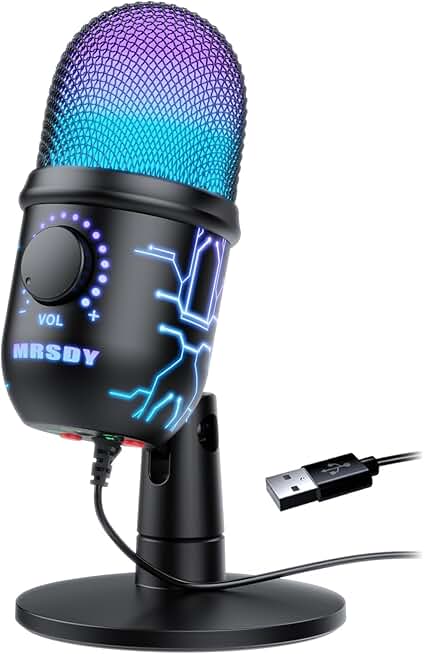
Our top pick for this approach is something like the MRSDY Gaming Microphone. This isn't about the brand; it's about the principle. It’s a condenser USB mic that proves the point: for under $20, you get a functional mic that, when used with a proper process (see above), can yield results that shame a bad XLR setup. The value is absurd, and it lets you invest your real money in acoustic treatment and education.
If you absolutely need an interface—say, for a multiple-host podcast or because you're committed to a specific XLR mic—you buy for driver stability, not for mythical sound quality. In 2026, the budget interfaces from established brands are all fine. The differences are marginal. Your choice should be based on which one has the most reliable drivers for your operating system, which is a frequent pain point many users consistently report.
The Single Biggest Mistake Interface Buyers Make
They buy for the inputs they ‘might’ need, not the inputs they actually need. They get a 4-input interface for their single microphone, ‘just in case’ they interview someone. Then, when they actually do an interview, they realize they need two mics, two stands, two cables, and a treated room big enough for two people. The ‘just in case’ planning is a fantasy that clutters your desk and drains your wallet. Buy for your actual, current use case. If you need to scale later, sell the simple unit and buy what you need then. Tech depreciates; don't future-proof.
The Final Verdict: Skip It (For Now)
For the vast majority of people searching for a youtuber audio interface in 2026, the move is to skip it. It’s an overrated solution to a misdiagnosed problem. Your audio quality plateau has nothing to do with your A/D converter. Invest your next $200 in room treatment, a decent mic arm, and a course on audio post-production. The difference will be staggering. A youtuber audio interface is a tool for specific, multi-source scenarios. It is not a magic badge of quality. Stop buying the badge and start building the skill. The gear is the easy part; the process is where the real magic happens.
For more on why your microphone might be overkill, read our take on Streaming Microphone Overkill: The 2026 Brutal Truth. And if you're wrestling with making it all work on one machine, our Single PC Podcasting Masterclass cuts through the complexity.
Frequently Asked Questions
Is an audio interface necessary for a YouTuber in 2026?
No, it is largely overrated. For a single-person setup, a high-quality USB microphone combined with proper room treatment and audio processing skills will deliver excellent results. The interface is often a solution to a problem most creators don't actually have.
What's the biggest mistake when buying a YouTuber audio interface?
Buying for future 'what-if' scenarios instead of current needs. Purchasing a multi-input interface for a single mic adds unnecessary cost and complexity. Driver stability and preamp noise are far more important than high sample rates.
Do XLR microphones sound better than USB microphones?
Not inherently. The connection type does not guarantee quality. A well-designed USB microphone can easily outperform a cheap XLR mic paired with a budget interface, especially in an untreated environment. The flexibility of XLR is often mistaken for a quality advantage.
Should I upgrade from USB to an XLR audio interface?
Only if you have a specific, tangible problem that an interface solves, like connecting multiple microphones or using a specific XLR mic you already own. If your USB mic is working, invest in acoustic treatment and education first—that's where you'll see a real ROI.
What should I look for in a USB microphone instead?
Look for a dynamic pickup pattern (better for noisy rooms), built-in shock mounting, and a reputation for durability. Features like a headphone jack for direct monitoring are useful, but the primary focus should be on simplifying your workflow and reducing room noise capture.

Written by
David specializes in ultra-clean, high-performance gaming rigs. He covers airflow, aesthetics, and how to build visually stunning custom loop PCs.
Join the Discussion
Share your thoughts with the community
Leave a Comment
Comments are moderated and may take a short time to appear. Links are not permitted.