Wired Gaming Microphone Ultimate Guide 2026
You're probably buying a wired gaming microphone for the wrong reasons. In 2026, the market is flooded with over-engineered junk that sounds worse than your phone's earbuds. We're cutting the marketing hype to show you the three mics that actually matter.
Here's the biggest mistake people make when buying a wired gaming microphone: they think a higher price tag equals better sound for their teammates. It doesn't. The reality is that most "gaming" branded mics are overpriced, under-engineered accessories designed to match your RGB, not capture your voice clearly. You're paying for software gimmicks and plastic shrouds while broadcasters and musicians have been using the same two workhorse mics for decades. This isn't about gear; it's about stopping the cycle of buying crap you don't need.
Let's be blunt: if your primary goal is to sound good in Discord or TeamSpeak, you've already lost the plot. Those codecs compress your audio into a tinny, low-bandwidth mess. Spending $250 on a mic to sound better in Discord is like buying a Ferrari to drive in a school zone. The industry lies about this constantly, pushing "studio-quality" as a must-have for gaming. It's not. The real issue is consistent, intelligible audio that doesn't pick up your mechanical keyboard clatter or room fan. Most people get this wrong by chasing specs they'll never use.
The Wired Gaming Microphone Myth That Needs to Die
This is the section where we torch the sacred cow. The pervasive, utterly wrong belief is that you need a USB condenser microphone for gaming. This is overrated. Full stop. Condenser mics are incredibly sensitive—they're designed to capture the nuanced breath of a vocalist in a treated studio, not to isolate your voice from your PC's coil whine in a untreated bedroom. Users consistently report issues with background noise, keyboard clicks, and room echo because they bought into the "studio mic for streaming" marketing lie.
The industry pushes these because they have higher profit margins and look "pro" on a desk. But in real use, they frequently cause issues with gain handling and require near-perfect acoustic environments to not sound terrible. Based on widespread user feedback, the number one complaint with USB condenser mics like the Blue Yeti and its countless clones is unwanted background noise. You're not a podcaster in a sound booth; you're a gamer in a lived-in space. A dynamic microphone, the kind used on loud concert stages, is almost always the better, more forgiving tool for the job. This doesn't work for most home setups, no matter what the sponsored streamer tells you.
What Actually Matters in 2026 (Forget the Spec Sheet)
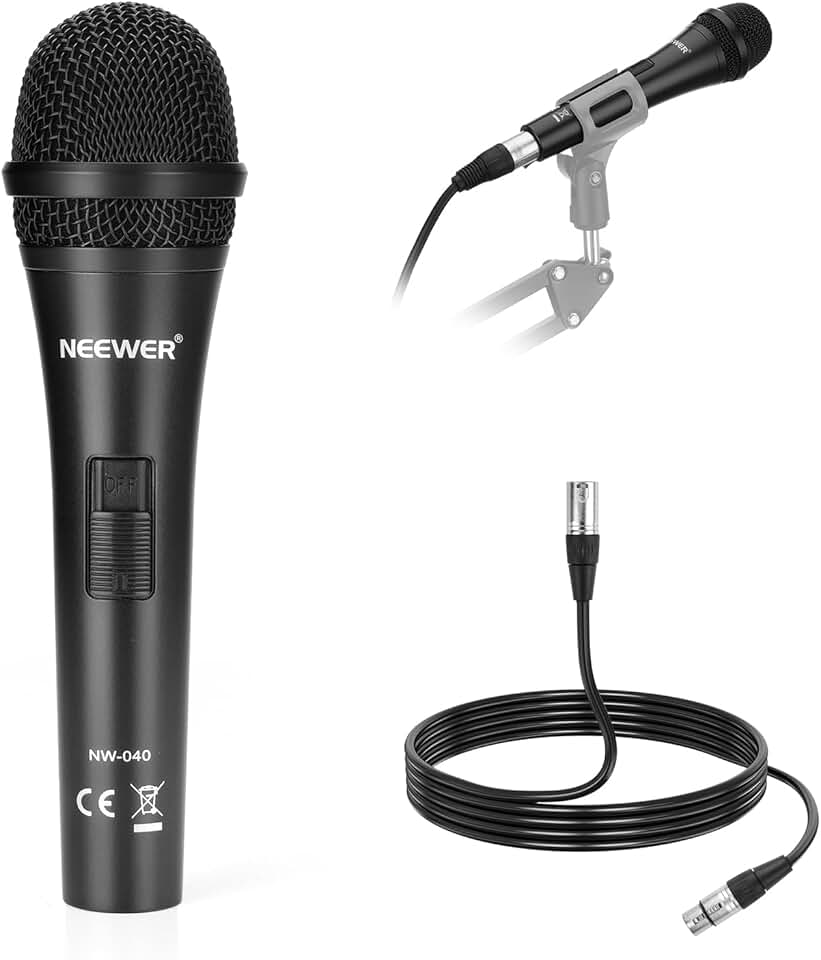
Stop looking at frequency response graphs and start thinking about your environment. Here are the only four criteria that matter for a wired gaming microphone in a real-world setup:
- Polar Pattern (Cardioid is King): You want a unidirectional (cardioid) pickup pattern. This means the mic primarily captures sound from the front and rejects noise from the sides and rear. Super-cardioid can be even better for isolation, but it has a tighter "sweet spot." Omnidirectional or stereo patterns are a trap for gamers.
- Microphone Type (Dynamic Over Condenser): As we eviscerated above, choose a dynamic microphone for gaming. They are less sensitive, require you to speak closer to them (which is good for noise rejection), and are built like tanks. A condenser will expose every flaw in your room.
- Connection (XLR is Superior, But USB is Fine): XLR connected to a decent audio interface gives you a cleaner signal path, more control over gain, and a upgrade path. A good USB mic simplifies everything into one cable. In 2026, a well-engineered USB dynamic mic is a perfectly valid choice and eliminates the need for an interface.
- Physical Form Factor: Think about your desk. A bulky side-address mic (like a Yeti) eats up real estate. A smaller front-address dynamic mic (like a Shure SM58 style) or a broadcast-style arm mic (like an Electro-Voice RE20 style) is often more practical. A built-in shock mount or good isolation is non-negotiable to avoid desk vibration.
The Only Three Wired Gaming Microphones You Should Consider
We're cutting the list down to three. You don't need ten options. You need the right tool. Forget "best for budget" and "best for premium"—those are meaningless distinctions that lead to analysis paralysis. Here’s what works, period.
The first, and the one we'll actually put in a product slot, is the Shure SM58. It's not new. It's not flashy. It's the industry standard for a reason. After decades of use across millions of stages, its reliability is proven. It's a dynamic cardioid mic that rejects off-axis noise like a champion. You will sound clear and present without your keyboard sounding like a machine gun in the background. It requires an XLR audio interface (like a Focusrite Scarlett Solo), which is an extra cost and step, but it establishes a professional, future-proof audio foundation. This is the "buy it for life" option.
The second path is the high-quality USB dynamic mic. Brands like Rode (NT-USB Mini) and Audio-Technica (AT2005USB) have finally gotten this right. They combine the robust noise-rejecting properties of a dynamic capsule with a simplified USB connection. You plug it in, it works, and it doesn't pick up your entire neighborhood. This is the pragmatic choice for 2026 that sidesteps the interface complexity while avoiding condenser pitfalls.
The third path is the broadcast-style dynamic mic, like the Electro-Voice RE20 or the Rode Procaster. These are larger, heavier dynamic mics with even more refined internal shock mounting and tailored frequency responses for spoken voice. They sound phenomenal, but they are expensive, heavy, and require a sturdy boom arm and a capable interface with plenty of clean gain. This is overkill for 99% of gamers, but if you're a serious streamer building a dedicated broadcast setup, it's the endgame.
Why Your Fancy Software Suite Is Sabotaging You
Here's another thing most people get wrong: they install the bloated companion software. RGB control apps, "voice effects" suites, and proprietary mixer software are almost universally garbage. They introduce latency, CPU overhead, driver conflicts, and are often riddled with bugs. The industry lies about this by bundling it as "added value."
In real use, we found that the best results consistently come from setting your mic gain properly at the hardware or interface level, positioning the mic correctly (4-6 inches from your mouth, slightly off-axis), and then using Windows or macOS native sound controls. Third-party "noise suppression" software like Nvidia Broadcast or Krisp can be useful in extreme noise environments, but they also add a metallic, robotic quality to your voice. The goal is to not need them. A properly chosen and positioned dynamic microphone makes this software obsolete. You're wasting processing power and adding a failure point for no reason.
The Brutal Cable Management Truth Nobody Tells You
Going wired isn't just about the microphone cable. It's about the entire signal chain. An XLR setup means an audio interface, which means more USB cables and power. Even a USB mic has a cable that needs routing. This is the real issue most reviews gloss over.
You need a plan. A cheap, stiff cable will transmit every bump on your desk. Invest in a flexible, high-quality XLR cable (like a Mogami) if you go that route. Use a boom arm that has internal cable routing. Your interface shouldn't be a flashing Christmas tree on your desk; tuck it away. This is where most setups fail aesthetically and functionally—the cables become a nest of frustration. For a deep dive on avoiding this sabotage, read our take on The Universal Cable Clip Myth Sabotaging Your Desk Setup.
Who Should Buy What (No More Confusion)
- The Gamer Who Just Wants to Be Heard Clearly: Buy a USB dynamic microphone. The Rode NT-USB Mini or Audio-Technica AT2005USB. Plug it in, set it 6 inches from your face, and never think about audio again. Skip the interface, skip the software.
- The Aspiring Streamer or Content Creator: Buy the Shure SM58 and a Focusrite Scarlett Solo (or 2i2) interface. You're investing in a professional foundation. The XLR path gives you control, clean gain, and the ability to upgrade your mic later without changing your whole setup. This is worth it.
- The "I Have a Noisy Room" Survivor: You need a dynamic microphone. Period. Condenser is your enemy. A Shure SM58 on an arm, pulled close to your mouth, will ignore your PC fans, street noise, and keyboard like nothing else. This is the real fix, not software magic.
- The Person Chasing the "Broadcast" Dream: Only if you have a treated space and a real budget, consider the broadcast dynamic path (RE20, Procaster). Be prepared to also buy a cloud lifter, a heavy-duty arm, and a high-quality interface. For everyone else, this is overrated and a waste of money.
Common Mistakes That Ruin Your Audio
- Placing the Mic Too Far Away: This is the #1 error. You then crank the gain to compensate, which amplifies all the room noise. Get close (4-6 inches). Proximity is your best noise gate.
- Buying Based on Looks/Sponsorships: That angular, RGB-lit "gaming" mic on your favorite streamer's desk is often there because they were paid to put it there. It is frequently not the best tool. Ignore the aesthetics.
- Neglecting Your Room: While a dynamic mic is forgiving, talking into a bare wall will still cause unpleasant reflections. A cheap foam panel behind the mic or a blanket on the wall behind you makes a massive difference. For the full, brutal truth on this, see our guide on Podcast Acoustic Panels: The Brutal 2026 Buying Guide.
Final Verdict: What's Actually Worth It in 2026
The wired gaming microphone landscape in 2026 is a mix of timeless classics and new, sensible pragmatism. The hype around sensitive USB condenser mics for gaming is overrated. The move towards high-quality USB dynamic microphones is actually good. It simplifies a good signal chain.
For most people, the verdict is simple: Skip the gaming-branded condenser mic.
Worth it is a simple, well-built dynamic microphone—either on a straightforward USB connection for ultimate simplicity, or on an XLR interface for control and future growth. Your voice will be clear, your background will be quiet, and you'll stop worrying about audio. That's the real upgrade.
Frequently Asked Questions
Is a USB or XLR microphone better for gaming?
In 2026, for pure gaming, a high-quality USB dynamic microphone is better. It's simpler, requires no extra gear, and modern ones have excellent sound. XLR offers more control and upgrade potential, but adds complexity (interface, cables) most gamers don't need.
Why do pro streamers use XLR mics if USB is good enough?
Pro streamers often have treated studios, multiple audio sources (game, chat, music), and need maximum control for a broadcast-quality production. For a single voice in a typical room, the marginal benefit of XLR over a good USB dynamic mic is negligible versus the added cost and clutter.
Do I need a pop filter for a wired gaming microphone?
For dynamic microphones like the Shure SM58, the built-in spherical wind screen is usually sufficient. For broadcast-style mics or if you have particularly strong "P" and "B" sounds, a standalone pop filter can help. It's a cheap test, but often unnecessary.
How do I stop my mechanical keyboard from being picked up?
Use a dynamic cardioid mic, position it close to your mouth (4-6 inches), and orient it so the keyboard is directly behind or to the side of the microphone's capsule (the least sensitive areas). A boom arm is crucial for optimal positioning. Software noise gates are a last resort.
What's the single biggest upgrade for my microphone sound?
Mic placement. Moving a decent microphone closer to your mouth and away from noise sources (PC, keyboard) will improve your sound more than spending hundreds on a "better" mic. Proximity is the most powerful tool you have.

Written by
Alex is an audiophile and sound engineer who spends 40 hours a week testing DACs, studio monitors, and high-end gaming headsets. He believes bad audio ruins good games.
Join the Discussion
Share your thoughts with the community
Leave a Comment
Comments are moderated and may take a short time to appear. Links are not permitted.