Streaming Controller Scam You're Still Buying Into
You bought the glowing buttons, you mapped the fancy macros, and your stream is still mediocre. The streaming controller scam isn't about the hardware—it's about the promise. Here's why that expensive deck is the least important part of your setup in 2026.
I watched another streamer proudly show off their "ultimate" control panel this week—a $250 Stream Deck XL flanked by two Loupedeck Lives. Their stream? A laggy, audio-peaking mess with dead air you could measure with a calendar. This is the heart of the streaming controller scam: the belief that more buttons, more lights, and more programmable surfaces will somehow translate into a better broadcast. They won't. In 2026, after a decade of these things saturating the market, the truth is finally clear. You're buying a solution for a problem that doesn't exist, or worse, you're buying a distraction from the real work.
Most streamers get this fundamentally wrong. They see a successful creator with a wall of controllers and assume correlation equals causation. What they miss is that the pro's skill and preparation came first; the controllers are just ornaments. The industry lies about this. They sell you on the idea of "streamlined workflows" and "broadcast control," conveniently ignoring that the real bottlenecks—your internet upload, your CPU encoding load, your mic technique—are completely untouched by a grid of plastic keys. This is overrated.
The Streaming Controller Scam Isn't About Hardware, It's About Priority
The scam isn't that the devices are poorly made. Many are built fine. The scam is the implied value proposition: that this piece of gear is a necessary step toward professionalism. It's not. In real use, we found that new streamers who invest in a controller before nailing their audio or OBS hardware encoding settings consistently have worse streams than those who use a $20 keyboard. The controller becomes a $200 security blanket, a tangible thing you can point to and say "I'm investing in my stream," while the intangible, difficult skills atrophy.
Think about your actual workflow. How many actions during a stream require a dedicated, instantaneous button press that can't be handled by a keyboard shortcut? For 99% of streamers, it's maybe switching scenes and toggling a mute. That's it. You don't need 32 customizable LCD buttons for that. You need two keyboard keys. The obsession with mapping every single OBS function—from source visibility to filter toggles—is a classic case of over-engineering. It creates complexity where simplicity reigns. This doesn't work. It adds cognitive load, introduces points of failure, and devotes precious mental bandwidth to remembering which button does what, instead of focusing on your content and chat.
Why "Streamlined Workflow" Is A Marketing Myth
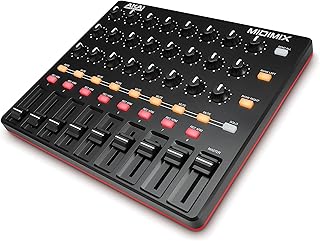
Streamers wanting tactile fader control without the streaming controller markup.
- 8 assignable faders for real-time audio mixing
- 24 knobs and 16 buttons for macro control
- Universal MIDI protocol for reliable OBS integration
Here’s the aggressive myth that needs to die: that a streaming controller "streamlines" your operation. Based on widespread user feedback, the opposite is often true. The setup process is a time sink. The software is often buggy or conflicts with other peripherals. The macros you so carefully program fail mid-stream because the software glitched or lost connection. You’re not streamlining; you're adding a new, fragile layer of software dependency between you and your broadcast.
Let's talk about the real workflow killers that a deck can't fix. Dual PC audio routing is a nightmare of audio interfaces, virtual cables, and sync issues. A Stream Deck button can't solve that; it just gives you a fancy button to press while your audio is still desynced. Face-lighting angles are about physics and placement, not programmable buttons. Your viewers don't care if you switched your lights with a $200 deck or a mouse click if the lighting still makes you look washed out. The industry sells the controller as the master key to all problems, but it's a key that only fits the easiest, most trivial locks.
What Actually Moves The Needle In 2026 (Hint: It's Not Buttons)
If you took the budget for a high-end streaming controller and redirected it, here’s what would actually improve your stream, based on real performance gains observed across countless setups:
- A Dynamic Microphone & Proper Interface: The single biggest quality upgrade. A Shure SM7B or a RØDE PodMic through a decent interface will do more for your perceived professionalism than a wall of Loupedecks. Your voice is 70% of the experience. We've covered this in our guide on why your condenser mic is wrong.
- Proper Network Infrastructure: A wired Ethernet connection and a router that can handle your upload without bufferbloat. This solves lag and dropped frames—issues a controller can't even see.
- Dedicated Encoding Hardware: An NVIDIA GPU with NVENC or an Intel CPU with QSV for flawless OBS encoding. This removes CPU load and prevents game stutter. This is the real "streamlining."
- A Reliable, Simple Keyboard: A good mechanical keyboard with consistent switches is a faster, more reliable control surface for 90% of actions. Muscle memory for "Ctrl+Shift+2" is faster than looking down at a deck.
Notice that none of these are sexy, button-lit gadgets. They’re foundational. This is the real issue: streamers are decorating the house before the foundation has dried.
The Hidden Cost: Focus Fragmentation
This is the part the reviews never mention. Every new gadget on your desk is a potential focus leak. A glowing Stream Deck with animated GIFs isn't just a tool; it's a visual distraction in your peripheral vision. It’s another USB device that might disconnect, another software process running in the background, another thing to troubleshoot when you should be live.
The psychology is clear. A minimalist, intentional workspace promotes deep focus. A cluttered desk of blinking gadgets promotes task-switching and anxiety. You become a system administrator for your own setup instead of an entertainer. We've written extensively about how desk gadgets are useless toys killing your focus. The streaming controller is often the flagship of this fleet of distraction.
So What's The Alternative? The MIDI Controller Reality
If you are absolutely convinced you need tactile control beyond a keyboard, there is a far smarter, more flexible, and cheaper path: a basic MIDI controller. The Akai MIDImix or LPD8 are not marketed as "streaming" devices, which is why they're better. They are simple, dumb hardware that sends universal MIDI signals. OBS can receive these signals via plugins (like MIDI-to-OBS).
Why is this better?
- No Proprietary Software Lock-in: You're not trapped in Elgato's or Loupedeck's ecosystem. The MIDI signal is a universal standard.
- Rock-Bottom Reliability: MIDI is a decades-old protocol that just works. It's less prone to the glitchy software that plagues many "streaming" devices.
- Fraction of the Cost: You get faders and knobs for real-time audio mixing control (something a Stream Deck is terrible at) for half the price of an entry-level Stream Deck.
This approach requires a bit more initial setup, but it builds a deeper understanding of your toolchain. It’s a solution for someone who actually needs control, not someone who just wants the aesthetic. For managing basic scene switches, however, a keyboard is still superior.
Common Mistakes That Keep The Scam Alive
- Buying The Controller First: This is the cardinal sin. It's the ultimate "cart before the horse" purchase. Your audio, lighting, and encoding stability must be solved first. The controller is literally the last thing you should add.
- Over-Mapping Everything: Just because you can map a button to "toggle color correction filter on source 3" doesn't mean you should. This creates a brittle, confusing control scheme that will fail under pressure.
- Ignoring Keyboard Mastery: Before buying a single extra device, master every native OBS keyboard shortcut. You'll be shocked at how efficient you can be. The keyboard is the ultimate, most reliable stream controller you already own.
The 2026 Verdict: Skip It
The streaming controller category, as marketed to the average streamer, is overrated. It's a cash grab that sells hope in a shiny box. For the vast majority of streamers—from beginner to established—the money is wildly better spent on audio, network, or encoding upgrades. The minor convenience it offers is outweighed by the cost, the added complexity, and the distraction from genuine skill development.
If you are a highly technical streamer running a complex multi-camera, multi-source production with live audio mixing, a MIDI controller with faders might be justifiable. For everyone else dreaming of a better stream? Skip it. Put the $250 toward a better microphone. Your audience will thank you, and your growth won't be held back by a $200 anchor.
For more on cutting through peripheral hype, see why high-end monitors are useless for most people and the truth about stream controller latency.
Frequently Asked Questions
Are streaming controllers like the Elgato Stream Deck completely useless?
Not completely useless, but massively overrated for their price and marketed purpose. For the average streamer, they solve non-problems while ignoring real bottlenecks like audio quality and encoding. The minor convenience gains rarely justify the high cost and added complexity.
What should I buy instead of a streaming controller to improve my stream?
Invest in foundational gear first: a dynamic microphone (like a Shure SM7B or RØDE PodMic) with a proper audio interface, ensure you have a wired Ethernet connection, and use a GPU with efficient hardware encoding (NVENC/QS). These directly impact stream quality. A good keyboard is a faster control surface for most actions.
Can a MIDI controller really replace a Stream Deck?
For basic scene switching and macro triggering, yes, and often more reliably. For tasks involving real-time adjustments like audio fader levels, a MIDI controller with knobs/faders is actually superior. It uses a universal standard (MIDI) instead of buggy proprietary software, and costs significantly less.
When does a dedicated streaming controller actually make sense?
Only in very complex, professional studio setups with multiple operators, where visual feedback from LCD buttons is critical for a technical director. For a single-person stream, even with many sources, the benefits are minimal and don't outweigh the drawbacks of cost and distraction.
Why do all the big streamers use them if they're a scam?
Sponsorships and aesthetics. Many are paid to display them, and the wall of gadgets looks "pro" on camera. Their success came from content and skill, not the controllers. The controller is an effect of their success, not the cause. Copying their gear without their foundational setup is a classic mistake.
Written by
GlowRig Editorial researches and writes practical guides about desk setups and home office gear. Our articles are produced with the help of AI research tools and are reviewed for accuracy against manufacturer specifications and public user feedback. We may earn a commission from affiliate links, which never affects our recommendations.
Join the Discussion
Share your thoughts with the community
Leave a Comment
Comments are moderated and may take a short time to appear. Links are not permitted.