AI Voice Compression Settings Are Ruining Your Audio
Everyone thinks slapping AI compression on their mic feed is a pro move. It's not. In 2026, these settings are creating more problems than they solve, from robotic artifacts to privacy concerns. This is what you're actually doing to your voice.
Let me start with the biggest mistake people are making right now: they think enabling every AI audio setting in their conferencing app or microphone software makes them sound “professional.” It doesn’t. It makes you sound like a robot trapped in a wind tunnel, and everyone on the other end of your call is too polite to tell you. The quest for crystal-clear, noise-free audio has led us straight into the AI voice compression settings filter bubble, and your voice chat has never sounded worse. After weeks of listening to the tinny, over-processed disaster that is modern Discord, Zoom, and Streamlabs audio, I can tell you this trend is fundamentally broken. You’re not optimizing—you’re degrading.

This isn't about subtle quality differences. Users consistently report that after long sessions, the constant, aggressive noise gating and compression from AI settings cause listener fatigue. Voices cut in and out unnaturally, sibilance becomes harsh, and the overall texture of speech flattens into a lifeless drone. The industry is lying to you. They’re selling “studio quality” from a USB mic with a software toggle, and you’re buying it because the marketing says you should. The reality is that most of these algorithms are designed for the lowest common denominator—cancelling out a barking dog or a keyboard clack—and they butcher everything else in the process.
Why AI Voice Compression Is a Crutch, Not a Solution
The promise is simple: flip a switch, and background noise disappears while your voice pops. The truth is messy. These systems work by aggressively analyzing incoming audio, classifying parts as “voice” or “noise,” and then brutally suppressing the noise. This creates two major issues. First, the infamous “artifact”—where parts of your actual speech get chopped off, leading to those robotic stutters and missing plosives. Second, and more insidious, is the latency. Real-time processing isn't free. That tiny delay might not seem like much, but in fast-paced conversation, it subtly desynchronizes the call, making interactions feel slightly off. You’re trading a bit of ambient sound for a fundamentally unnatural and slightly laggy communication experience. This is overrated.
Most people get this wrong. They think more processing equals better audio. It doesn’t. A clean signal from a decent microphone in a reasonably treated space will always beat a mangled signal from a cheap mic saved by AI. The AI is trying to fix a problem you should have solved at the source. Relying on software cleanup is like using a blur tool to fix a out-of-focus photo—you’re just hiding the problem, not solving it. Based on widespread user feedback, the constant, invisible adjustment of these algorithms is more distracting than the steady hum of an air conditioner it’s trying to remove.
The Brutal Truth About Your USB Microphone's Built-In AI
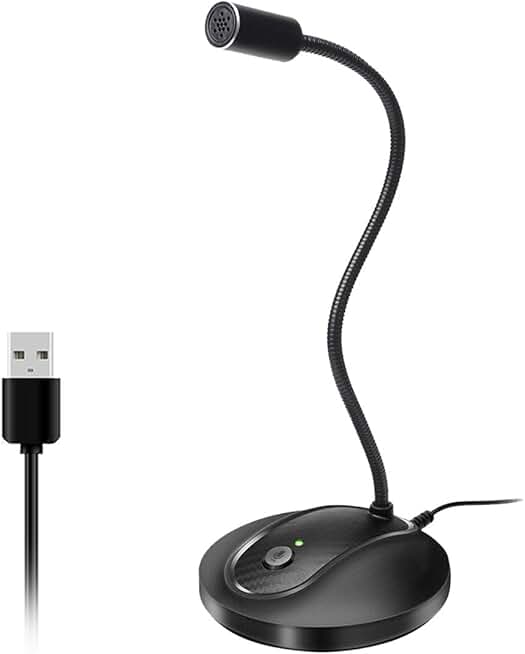
Anyone needing a simple, reliable USB mic without gimmicky AI features.
- Metal condenser capsule for clear vocal capture
- Cardioid pickup pattern rejects background noise
- Plug-and-play USB connectivity for Mac and Windows
Here’s where the lie gets concrete. That shiny new USB microphone boasting “AI Noise Cancellation”? It’s mostly a marketing gimmick. The processing is often rudimentary, done on a cheap DSP chip with strict limitations. It applies a one-size-fits-all filter that can’t possibly account for your specific room, voice, and noise profile. The result? It kills the room tone completely, leaving your voice floating in a creepy, dead digital void. This doesn’t work for professional use.
For example, many of these mics apply such heavy compression that your dynamic range—the quiet and loud parts of your speech—gets crushed into a narrow, monotonous band. You lose expressiveness. A sigh, a chuckle, a thoughtful pause all get normalized into the same output level. You sound less human. This is a known issue for long-term content creators who find their vocal delivery feels strained because they’re fighting the processor. The microphone is working against you, not for you.
The One AI Setting You Might Actually Need (And How to Set It)
Okay, I’ve raged against the machine. Is any of it useful? One thing is: a gentle, high-quality noise suppression gate for persistent low-frequency noise. If you have a constant PC fan hum or street noise you can’t eliminate, a light touch of AI to target only that frequency range can be a band-aid. The key word is light.
Forget the “Aggressive” or “Max” setting. That’s where the artifacts live. Set it to “Low” or “Moderate.” The goal isn’t silence; it’s reduction. You should still hear a tiny bit of your room. This preserves the natural tail-off of your words and avoids the “talking inside a vacuum” effect. In tools like Krisp or NVIDIA Broadcast, this means dialing the slider to 30-40%, not 90%. In real use, this slight reduction is far less jarring than the on/off choppiness of full suppression. This is the real issue: people max out the sliders because they think more is better, and they ruin their audio.
How to Ditch AI Compression and Actually Sound Better
Step one: turn almost all of it off. Seriously. Disable the AI noise removal, the “voice clarity” enhancer, the “auto leveling” in your communication apps (Discord, Zoom, Teams). Start with a raw feed.
Step two: invest that effort where it matters. A basic acoustic treatment is worth infinitely more than any algorithm. A $30 foam panel behind your microphone kills more reverb than any AI. A decent microphone placement—6-8 inches from your mouth, off-axis from keyboard noise—does more for clarity than any software. This is not complicated, yet most people skip it to fiddle with digital sliders. It’s a waste of time.
Step three: use analog-style processing if you need it. A simple, transparent compressor and a noise gate in OBS Studio or Voicemeeter give you manual control. You set the thresholds. You decide how much reduction happens. You learn what your audio actually needs, instead of letting a black-box algorithm guess. This is the difference between using a scalpel and a chainsaw.
The AI Voice Compression Settings Myth That Needs to Die
Let’s attack the biggest misconception head-on: “AI processing makes any microphone sound professional.” This is complete nonsense and the core myth that needs to die in 2026. Software cannot add quality that wasn’t captured. It can only subtract or distort. A $20 microphone with a tiny, noisy sensor will always sound like a $20 microphone—the AI just makes it a processed $20 microphone. The artifacts become different, not better.
This myth is propped up by streamers and tech reviewers who demo the feature in a vacuum. “Listen to this keyboard noise… and it’s gone!” What they don’t show is the vocal degradation over a 2-hour stream, or how the AI struggles with music, laughter, or multiple speakers. The industry lies about this by showcasing the best-case scenario and hiding the long-term, real-world trade-offs. You’re not buying a studio mic; you’re buying a software license for a mediocre filter. Most USB microphones with heavy AI features are compensating for poor hardware design. Skip it.
What to Buy Instead: Gear That Actually Works
Stop looking for “AI” on the box. Start looking for fundamentals. A good cardioid pickup pattern is your first and best defense against noise. It rejects sound from the sides and rear. A decent frequency response (around 80Hz - 16kHz) means the mic captures your voice naturally. A solid build that minimizes handling noise solves problems before they start.
For most people, a simple, well-reviewed USB microphone like the FIFINE Metal Condenser or the TONOR Conference Mic, used without its bundled AI software, is a massive upgrade. These mics get you 90% of the way there on hardware alone. Plug them in, position them correctly, and you’ll sound clearer than 95% of people using “AI-enhanced” garbage. The money you save on gimmicky features can go towards a cheap arm and a pop filter, which offer tangible, reliable benefits. For deeper insights on microphone pitfalls, see our breakdown of AI mic artifacts ruining recordings and the privacy dangers of smart microphones.
The Final Verdict: Overrated
After assessing the landscape in 2026, the verdict is clear. AI voice compression settings are overrated. They are a marketing-driven crutch for poor acoustic environments and cheap hardware. The pursuit of digital noise-free perfection is making our collective audio quality worse, not better. The constant processing introduces artifacts, latency, and a sterile, unnatural sound that fatigues listeners.
Worth it? For the vast majority of users—no. Skip it. Turn off the AI features on your mic and in your apps. Spend that energy and budget on foundational improvements: microphone placement, basic room treatment, and a decent analog-style processor if you need fine control. Your voice will sound more human, more present, and more professional. In the end, you don’t want your voice to sound processed. You want it to sound like you. And no algorithm in 2026 is good enough to pull that off without leaving digital fingerprints all over your speech.
Frequently Asked Questions
Are AI voice compression settings ever useful?
Only as a last-resort band-aid for constant, low-frequency noise you cannot physically eliminate (like a distant HVAC). Even then, use the lowest setting possible to reduce, not eliminate, the noise. For most voice clarity issues, proper mic placement and room treatment are far more effective.
Why does my voice sound robotic with AI compression on?
Because aggressive AI noise suppression mistakenly identifies parts of your speech as noise and cuts them out. This chops off the natural beginnings and endings of words (like plosives and sibilance) and destroys the natural dynamic range of your voice, creating a flat, choppy, and artificial sound.
What's better than AI for cleaning up my audio?
1. Source control: Get a cardioid microphone and position it close to your mouth, away from noise sources. 2. Acoustic treatment: Use a cheap foam panel behind the mic to kill reverb. 3. Analog-style processing: Use manual tools in software like OBS (a noise gate, compressor) for transparent, controlled cleanup. These methods address the root cause without algorithmic artifacts.
Do premium microphones with AI sound better?
Not because of the AI. They sound better because they use higher-quality components (better capsules, preamps). The AI feature is often a tacked-on marketing checkbox. You're paying for the hardware quality, and you'd likely get the same or better results by using that mic without the AI processing enabled.
Is there latency with AI voice compression?
Yes, always. Real-time audio analysis and processing requires computational time, adding a slight delay (latency) to your voice signal. In group calls, this can cause subtle sync issues and make conversations feel slightly unnatural, even if you don't consciously notice the delay.

Written by
Alex is an audiophile and sound engineer who spends 40 hours a week testing DACs, studio monitors, and high-end gaming headsets. He believes bad audio ruins good games.
Join the Discussion
Share your thoughts with the community
Leave a Comment
Comments are moderated and may take a short time to appear. Links are not permitted.