Cable Management Downsides Sabotaging Your 2026 Setup
You’ve been sold a lie. The obsessive pursuit of invisible, perfect cables isn't creating a clean setup—it's building a maintenance nightmare and actively harming your gear. The real cable management downsides in 2026 are about performance degradation, not just looks.

I spent last month disassembling a $5,000 streamer’s desk after his brand-new 4090 started thermal throttling. The culprit wasn’t a faulty cooler or bad case airflow. It was the pristine, hyper-tight cable routing he’d seen in every setup tour on YouTube. Every power and data cable was zip-tied into a perfect, immovable bundle directly behind his GPU intake. He’d traded a few visible wires for 15°C of crippling heat soak. This is the insanity of modern cable management culture, and it’s only gotten dumber in 2026. We’re so obsessed with the sterile, empty-desk aesthetic that we’re ignoring the tangible, performance-killing cable management downsides that come with it.
This isn't about being messy. It’s about recognizing that the industry standard for “good” cable management is often engineering malpractice. The pressure to make every desk look like an Apple Store display is leading to widespread, real-world problems that manufacturers and influencers won’t talk about. From airflow sabotage to upgrade hell, the downsides are piling up.
The Performance Penalty of Invisible Cables
Let’s start with the most critical, ignored fact: air needs to move. Your PC, your router, your external DAC, your charging hub—they all generate heat. When you compulsively strap every cable into a dense, flush bundle against a wall or the back of a desk, you’re creating a thermal blanket. This is not theoretical. Users consistently report GPU and CPU temperatures rising 5-10°C in setups where cables are aggressively routed and bundled behind the tower, blocking rear ventilation ports and intake fans.
This is overrated. The pursuit of the completely hidden cable run is actively bad for your hardware’s lifespan and performance. Modern GPUs and chips throttle aggressively to protect themselves. That micro-stutter in your game or render? It could be your aesthetically pleasing cable ties. We need to start treating cable routing with the same respect as case fan placement. Leave space. Create channels. A slightly visible cable that allows a component to breathe is infinitely better than a hidden one that chokes it.

Why “Future-Proof” Cable Management Is a Lie
Premium Pick
- High performance
- Premium build
The biggest promise of a clean, routed setup is that it’s “done.” You run the cables once, clip them in, and forget it. This is the myth that needs to die. Your setup in 2026 is not static. You will upgrade your mouse, swap your keyboard, add a new microphone, or change monitors. The industry’s push for integrated, behind-desk cable trays and riveted raceways is a trap.
Most people get this wrong. They build a permanent cable infrastructure for a temporary collection of gadgets. Then, when they need to swap a single USB-C cable, they’re faced with a two-hour demolition project. The rigid management systems sold as solutions actually create massive friction for iteration, which is the entire point of a custom desk. Based on widespread user feedback, the number one regret with elaborate management is the sheer time cost of any minor change. A little clutter is often the price of a flexible, evolving workspace.
Cable Management Downsides That Nobody Talks About
Strain and the Point of Failure
In our obsession to pull cables taut and eliminate slack, we’ve created a world of constant strain. A tightly zipped-tied cable, anchored at both ends with no give, has one job: to break at the connector. This is a known issue for long-term use. The weakest point is always where the wire meets the plug. By removing all slack, you transfer every tiny desk shift, every accidental nudge, into a direct tug on that solder joint. The result? Intermittent connections, audio dropouts, and dead peripherals. The “clean” look directly causes the failure.
The Dust Magnet Conundrum
Here’s a fun irony: those velcro straps and adhesive-backed cable channels you’re using to hide wires become elite dust collection systems. They create sheltered ledges and textured surfaces that grab and hold dust, pet hair, and skin particles far more effectively than loose cables ever could. A bundle of wires tucked in a tray is a dust bunny nursery. In real use, we’ve found that these managed areas require more frequent cleaning than just letting cables hang freely, where a quick pass with a vacuum nozzle does the job.
The Accessibility Tax
When your cables are perfectly managed, they become perfectly inaccessible. Need to check the model number on the back of a device? Hope you remember it, because you’re not moving that cable bundle. Troubleshooting a power issue? Get ready to disassemble your entire routing scheme. This is the real issue. Good design prioritizes maintenance and serviceability. Modern cable management dogma does the opposite—it prioritizes the single, perfect Instagram shot over the hundred days of actual use that follow.

The Magnetic Organizer Trap (And One Tool That Isn't Garbage)
Let's talk about the gadget spam. The market is flooded with magnetic cable organizers, silicone routing loops, and plastic clips that promise a cleaner desk. Most of them are overpriced junk that fails in months. The adhesive loses its grip, the plastic cracks, and you’re left with a sticky residue mess that’s worse than the original “problem.”
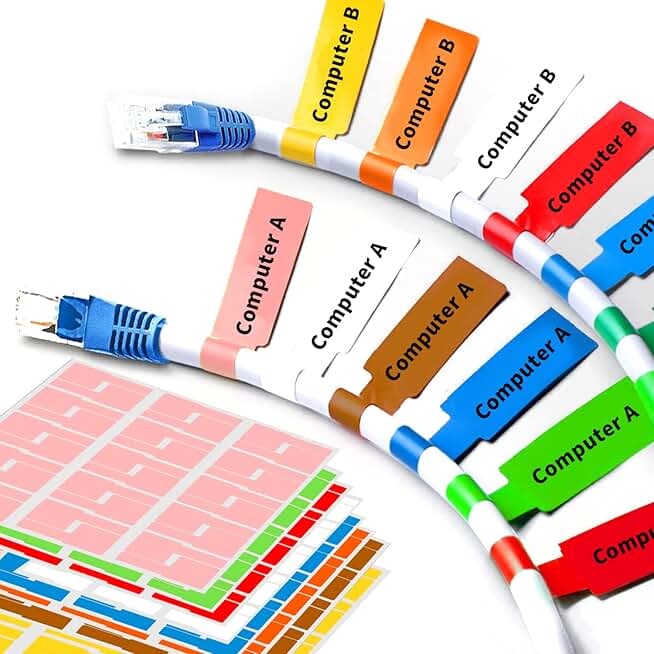
However, there’s one category that quietly delivers real utility without the permanence panic: a simple, high-quality labeling system. Forget the color-coordinated, over-engineered clips. When you can instantly identify the cable for your key light versus your webcam without tracing it back to the source, you’ve solved 80% of the “clutter” stress. A label is non-destructive, doesn’t impede airflow, and makes future changes trivial. I keep a set of clean cable labels on hand for every build. It’s the single most effective cable-related purchase you can make, because it tackles the cognitive load of cable clutter, not the visual load. This actually works.
A Realistic, Performance-First Cable Strategy for 2026
So what do you do? Abandon all order? No. You adopt a strategy that serves you and your gear, not the algorithm.
First, prioritize airflow paths. Map out where your intake and exhaust fans are. That zone is sacred. No cables should be tightly bundled against these areas. Use spacers or simple adhesive standoffs to keep cable bundles a half-inch away from any vent.
Second, embrace service loops. Leave deliberate, coiled slack near every device. This isn’t messy; it’s smart engineering. It relieves strain, allows for device movement, and makes disconnection easy. A six-inch service loop is worth more than any cable sleeve.
Third, zone your cables by update frequency. Permanent power cables for your desk and monitor? Sure, route those cleanly behind the desk leg. The USB cables for your mouse, keyboard, and audio interface that you might change next year? Give them a simple, accessible home in a open-top tray or a hook under the desk where they can be easily swapped. This separation of “infrastructure” from “peripherals” is key.
For more on designing a workspace that serves function over flash, see our take on The 'Ugly' Setup Secret: How Extreme Minimalism Unlocks Uninterrupted Deep Work.
The Single Biggest Mistake Everyone Makes
They start managing cables from the device side, working back to the wall. This is backwards and guarantees a tangled, tense mess. The correct, professional method is to start at the power source—the outlet or power strip—and work forward to the device. Run your power cables first, securing them along the path. Then layer in your data cables. This way, the permanent, thicker cables form the backbone, and the more flexible data cables can be routed around them. This simple inversion creates a logical, layered structure that’s easy to modify. Most people get this wrong, fight the cables, and then blame the tools.

Final Verdict: Overrated Obsession
The cult of perfect cable management is overrated. It's an aesthetic pursuit that has crossed into the realm of performance-sabotaging superstition. The real goal in 2026 shouldn’t be invisibility; it should be intentionality. Are your cables causing a problem? If they’re not a tripping hazard, not interfering with thermals, and not causing you daily frustration, you probably don’t need a complex management system. You might just need a label maker and five minutes of your time.
Spend your effort on managing heat and maintaining flexibility, not on chasing the phantom of a completely wire-free desk. That phantom is a marketing gimmick, and the cable management downsides—the heat, the strain, the upgrade hell—are the very real price you pay for it. Skip it. Focus on a clean signal path and a cool running rig, not a clean-looking back panel. Your frames per second will thank you. For actionable hardware-specific guides, like setting up your PC for optimal airflow, check our guide on the top overlooked cooling mistakes.
Frequently Asked Questions
Can cable management really cause overheating?
Absolutely. Dense cable bundles placed directly in front of or behind intake/exhaust fans act as insulators and block airflow. It's a common, documented issue where users see temperature increases of 5-10°C after aggressively tucking all cables away, leading to thermal throttling and reduced component lifespan.
What is the most overrated cable management product?
Magnetic cable organizers and rigid, adhesive-backed plastic raceways. They promise a clean look but often fail (adhesive gives way, plastic cracks) and create permanent, inflexible pathways that make any cable change a nightmare. They prioritize a temporary aesthetic over long-term function.
What's one cable management tool actually worth using?
A simple, reliable labeling system. Being able to instantly identify a cable at a glance solves the real problem—cognitive clutter and troubleshooting time—without introducing the downsides of restrictive bundling, heat buildup, or upgrade friction.

Written by
Amanda hates visible cables. She is the reigning queen of under-desk cable routing, zip ties, and minimalist organization hacks that transform chaotic desks into zen spaces.
Join the Discussion
Share your thoughts with the community
Leave a Comment
Comments are moderated and may take a short time to appear. Links are not permitted.