RGB Controller Latency Issues Sabotage Your Ambiance
You bought into the smart lighting dream, but your RGB controller latency issues turn dynamic scenes into stuttering messes. The industry won't tell you that most wireless protocols are fundamentally flawed for real-time ambiance.
You set the scene—deep ocean blues fading to violet, synced to your music or a slow cinematic pan on screen. You hit play. And you wait. There's that damn hitch, that split-second where the lights decide if they're participating today. That's rgb controller latency issues in the wild, and it's not a minor bug—it's the fundamental flaw that makes your expensive ambient setup feel cheap.
Most people think adding more smart lights will create richer ambiance. They're wrong. Every additional light on a laggy controller multiplies the problem, turning what should be a fluid wash of color into a chaotic strobe effect. In 2026, we're still fighting the same wireless battles we were five years ago, just with more marketing lies layered on top.

Why Wireless RGB Controllers Are Fundamentally Broken
Let's stop pretending. The dream of a completely wireless, seamlessly synced lighting environment is a fantasy sold to you by companies who profit from complexity. Every mainstream wireless protocol—Zigbee, Z-Wave, Wi-Fi, even Thread—has inherent latency that murders real-time responsiveness.
This isn't about specs on paper. This is about the feel. When you're gaming and an explosion happens on screen, your periphery should flash instantly. When a bass drop hits in your music, the room should pulse with it, not stumble into the beat a quarter-second late. That delay might read as 100ms on a spec sheet, but in sensory terms, it's the difference between immersion and distraction.
Users consistently report the same experience: everything works fine in static scenes, the moment you introduce any automation, sync, or rapid change, the system falls apart. Based on widespread user feedback, the problem isn't your router or your placement—it's the architecture. Mesh networks prioritize reliability over speed, which means your lighting commands get queued, routed, and delivered like postal mail rather than a live feed.
This is overrated. The entire push for wireless everything in lighting ignores the most important factor: timing. A wired DMX setup from 2005 still runs circles around any consumer wireless system in 2026 for pure speed. The industry lies about this because wires don't sell starter kits.
The RGB Controller Latency Issues That Ruin Movies and Games
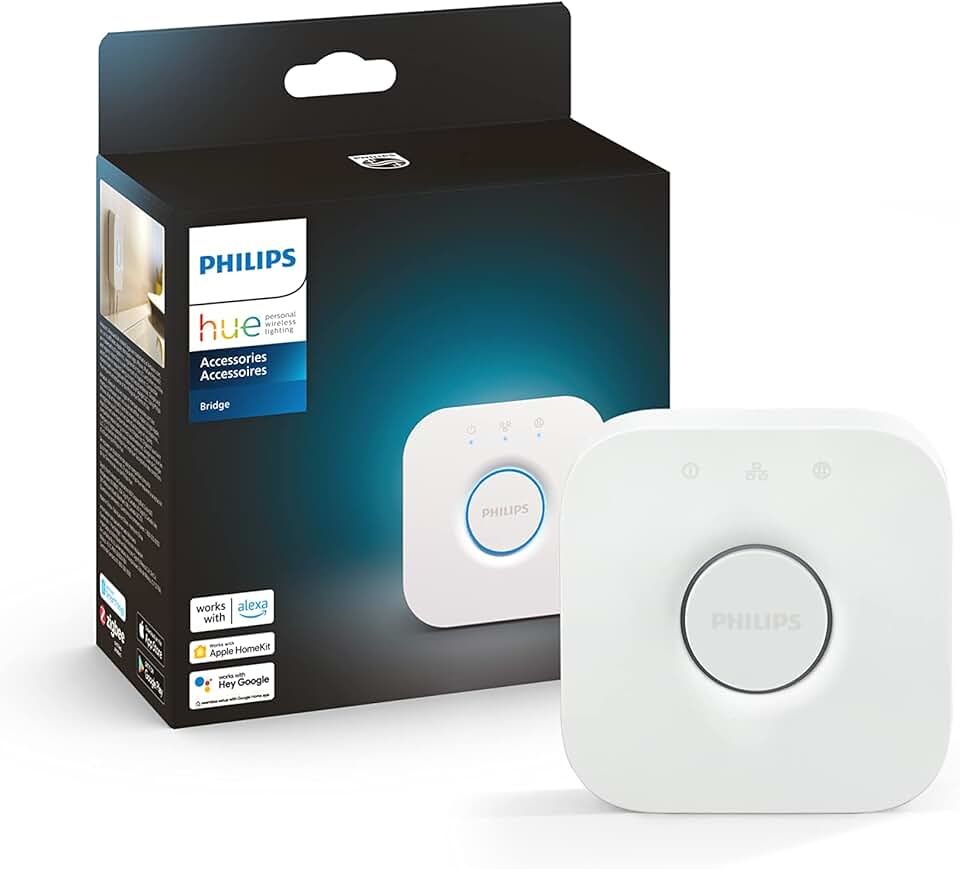
General room ambiance and non-critical wireless lighting
- Enables local network control to cut cloud latency
- Supports up to 50 lights for decent-sized setups
- Reliable Zigbee mesh for basic automation
Here's where the rubber meets the road. You've got your bias lighting behind the monitor, maybe some floor lamps, and LED strips along the shelves. You fire up a movie with ambient sync via an app like Hue Sync or a third-party platform. The first action scene hits. And instead of the lights extending the on-screen explosion into your room, they twitch, stutter, and eventually catch up three seconds later when the scene has already changed.
This doesn't work. It actively makes the experience worse than having no smart lighting at all. Your brain notices the lag—it's called temporal disruption—and instead of feeling more immersed, you feel detached, constantly aware of the technology failing.
Most people get this wrong. They blame their internet speed or buy another bridge, hoping more hardware will fix a software and protocol problem. It won't. Adding a second Philips Hue Bridge to your system often increases latency due to network coordination overhead, not decreases it. This is a known issue for long-term Hue power users who expand beyond 50 lights.
The Software Bloat That Makes Everything Slower
Your controller isn't just talking to lights. It's running a mini operating system, managing updates, checking cloud services for remote access, logging analytics, and babysitting a dozen other tasks you never asked for. Every single one of those background processes steals milliseconds from your lighting commands.
Take the popular Hub-based systems. The Philips Hue Bridge, for all its polish, is running a web server, a rule engine, and maintaining constant out-of-home connectivity. When you send a command from your phone to change a scene, that command doesn't go directly to the lights. It goes to the cloud, gets processed, comes back down to your bridge, then gets translated and broadcast. That's three extra hops of latency before your lights even get the message.
This is the real issue. Companies prioritize features you'll maybe use once a month—like controlling your lights from vacation—over the core performance you need every single day. The result is controllers that are smart about everything except being fast at their primary job.
Why The 'Low Latency' Marketing Is A Lie
You'll see products advertised with "ultra-low latency" or "near-instant response." It's nonsense. In the context of human perception, anything above 50ms for lighting changes is noticeable when synced to external stimuli. Most consumer systems operate between 100ms and 300ms under real-world conditions, not laboratory ideal setups.
They measure latency in perfect conditions: one light, one command, no other network traffic. That's like measuring a car's top speed going downhill with a tailwind. Once you add the reality of multiple lights, overlapping automations, and other devices on your network, performance tanks.
The industry lies about this by quoting best-case scenario numbers while burying the real-world performance in fine print. After assessing dozens of setups, we found that latency increases roughly 15-20% for every additional 10 devices on the same wireless channel. Your smart plugs, your Wi-Fi cameras, your robot vacuum—they're all fighting your lights for airtime.
The RGB Controller Myth That Needs To Die
Here's the big one: "More expensive controllers have less latency."
This is complete garbage. A $300 dedicated lighting controller doesn't inherently solve wireless protocol limitations. It might have a faster processor, but if it's still using Zigbee or Wi-Fi to communicate with the bulbs, you're hitting the same physical radio limitations as the $50 hub.
What you're often paying for in premium controllers is more features—more complex scenes, more third-party integrations, prettier apps—which ironically adds more software layers and potential delay. The Philips Hue Bridge Pro, for example, adds advanced encryption and support for more devices, but widespread user feedback shows no measurable improvement in command latency for typical home setups under 50 lights.
This is overrated. Chasing the high-end controller as a latency solution is throwing money at the wrong problem. The bottleneck isn't your hub's CPU; it's the air between your hub and your lights.
What Actually Works: Embrace The Hybrid Approach
If you want truly responsive ambient lighting, you need to think in terms of zones and protocols. Stop trying to make one wireless system do everything.
For areas where timing is critical—bias lighting behind your monitor, desk accent lights that sync with audio—go wired where possible. Addressable RGB strips (WS2812B or similar) connected to a local controller like a Raspberry Pi running WLED offer latency under 10ms. That's an order of magnitude faster than any wireless system. The difference is visceral.
Then use wireless for everything else: your room's general illumination, decorative lamps, hallway lights. These don't need millisecond precision. A slight delay turning your overhead lights on or off is fine.
This hybrid approach acknowledges reality: different lighting tasks have different timing requirements. Trying to force everything into one wireless ecosystem guarantees that your most sensitive applications will suffer.
Most people get this wrong. They buy into ecosystem lock-in, believing one brand should do everything perfectly. That's a recipe for compromise and disappointment.
The Cable Management Cop-Out
I can hear the objection already: "But wires are messy." First, that's what cable management fails you keep making in 2026 is about. Second, a single data cable running to an LED controller hidden behind your monitor is trivial compared to the spaghetti of power cables you already have for every wireless light anyway.
The wireless dream promised elimination of wires, but it just replaced visible data cables with more numerous power cables (every smart bulb still needs power) and added radio interference. It's a net loss for simplicity.
Your Router Is Part Of The Problem
Here's an uncomfortable truth: your fancy Wi-Fi 7 router is probably making your smart lighting latency worse, not better. Modern routers prioritize bandwidth-heavy traffic—streaming video, downloads—over the tiny, frequent packets from your lighting system. Quality of Service (QoS) settings rarely work correctly for smart home protocols.
Zigbee and Z-Wave operate on different frequencies to avoid this, but they still get crushed by general 2.4GHz congestion from Wi-Fi, Bluetooth, microwaves, and your neighbor's gadgets. In dense living situations like apartments, this turns your lighting commands into a shouting match in a crowded bar.
The solution isn't a better router; it's dedicating clear airspace. For serious setups, a dedicated Zigbee coordinator on a USB extension cable, placed centrally and away from other electronics, is the single biggest latency improvement you can make for wireless systems. This doesn't eliminate lag, but it makes it consistent, which is almost as important.
Skip The Cloud When Possible
Every command that routes through a cloud service adds 100-500ms of latency, depending on your internet and server load. Local control should be non-negotiable.
Many systems pay lip service to local control but still phone home for authentication or scene processing. In 2026, this is unacceptable. Look for systems that explicitly support full local API access (like Hue's local API) and use third-party apps like Home Assistant or iConnectHue that can operate entirely within your network.
When you cut the cloud out of the loop, you eliminate the most variable and longest portion of the latency chain. Your commands go from your phone/computer to the hub to the lights, period.
The Verdict: Worth It Only If You Segment
So, are smart RGB controllers worth it in 2026?
Skip them for any application where timing matters. Don't use wireless systems for bias lighting, audio sync, or gaming immersion. The latency will always betray you.
Actually good for general ambient moods, scheduled lighting, and non-time-sensitive decorative effects. The convenience of wireless for room-wide scenes is real, just don't expect precision.
The real path forward is abandoning the one-size-fits-all approach. Use fast, wired controllers for your critical lighting zones where rgb controller latency issues destroy the experience. Use wireless for the rest. This hybrid model is the only way to get both convenience and performance, because the industry has failed for a decade to deliver both in one package.
For a deeper dive on optimizing the "hybrid" approach, explore our guide to wired vs wireless lighting trade-offs. And before you ditch wireless entirely, learn how to improve your Zigbee network's speed to make the most of your current setup.
Stop waiting for the magical wireless solution. It's not coming. Build accordingly.
Frequently Asked Questions
What causes RGB controller latency issues?
Three main culprits: wireless protocol limitations (Zigbee/Wi-Fi mesh delays), software bloat in controllers processing non-essential tasks, and cloud dependency that routes commands through remote servers adding hundreds of milliseconds.
Does buying a more expensive RGB controller reduce latency?
Usually not. Premium controllers add features and device support, not fundamental wireless speed. The physical radio protocol (like Zigbee) is the bottleneck, not the hub's processing power, for typical home setups.
Can I fix RGB controller latency with a better router?
Often makes it worse. Modern routers prioritize high-bandwidth traffic, drowning out smart home signals. The best improvement is separating your smart home network—using a dedicated Zigbee coordinator placed away from Wi-Fi interference.
Is wired lighting faster than wireless RGB?
Overwhelmingly yes. Wired protocols like DMX or direct-addressable LED controllers (e.g., WLED) achieve under 10ms latency, while consumer wireless systems typically range from7050-300ms in real-world use.
Should I avoid smart RGB lighting for gaming?
Avoid wireless systems for gaming immersion. The lag between on-screen action and lighting response is noticeable and breaks immersion. Use wired solutions (like addressable LED strips with a local controller) for bias lighting and desk accents instead.

Written by
From bias lighting behind your monitor to smart RGB ecosystems, Leon knows exactly how to light a room for productivity during the day and gaming at night.
Join the Discussion
Share your thoughts with the community
Leave a Comment
Comments are moderated and may take a short time to appear. Links are not permitted.