Cable Management Fails You Keep Making in 2026
Your clean desk is a lie because of cable management fails. We've seen every overpriced tray and sleeve. Here's the brutal truth about what actually works and what's a waste of money in 2026.

Here's a cable management fail you're probably making right now: you're buying solutions to hide cables, not manage them. The industry wants you to think a desk covered in J-channel raceways and fabric sleeves is "clean." It's not. It's just hidden chaos, and hidden chaos is worse than visible chaos because you can't fix what you can't see. Most people's cable management fails because they prioritize aesthetics over function, creating a nightmare for anyone who needs to swap a mouse or add a new device. Let's rip this band-aid off.
The Biggest Lie: Clean Means Hidden
The biggest cable management fail isn't a messy desk; it's a desk that looks clean but is a disaster underneath. The YouTuber setup with zero visible wires? That's a lie for 99% of real-world use. Those setups are staged for a 10-minute video, not for a human who actually works there. They require a permanent, unchanging hardware roster—something that hasn't existed since the era of the wired desktop phone. If you're constantly plugging in a laptop, a phone, a tablet, a controller, or any other modern peripheral, a rigid, sealed system is your enemy. The industry sells you on the image of order, not the reality of a functional, adaptable workspace. This obsession with hiding everything is why you have a drawer full of adapters and a power strip groaning under the weight of nine bricks.

Why Most Cable Management Products Are Overrated
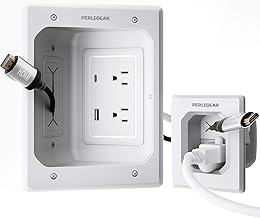
Final, polished installations for wall-mounted displays or fixed setups.
- Recessed in-wall power and data pass-through
- Includes USB and USB-C charging ports
- Creates a truly clean, built-in look
Walk into any office supply store and you'll be assaulted by solutions for a problem you don't have. The cable management aisle is a monument to over-engineering. Let's be blunt: most of it is garbage. Velcro ties? Great, unless you need to change something, then they're a pain. Adhesive cable clips? They fail, leave residue, and rip the finish off your furniture. That "ventilated" cable tray you bought? It just collects dust bunnies and becomes a permanent home for cables you haven't used in two years. The real issue isn't a lack of products; it's a surplus of bad ones designed to be sold, not used. Most people get this wrong by buying a kit before diagnosing the problem. You don't need a 26-piece kit; you need three things done right: power delivery, data routing, and slack control. Everything else is marketing.
Cable Management Fails: The Accessory Trap
This is a dedicated section to call out the single biggest scam in this space: the belief that more accessories equal better management. It's wrong. You're being sold a fantasy.
The Fabric Sleeve Fire Hazard You're Ignoring
We've said it before in our piece on Cable Sleeve Fire Hazard: The 2026 Brutal Reality Check, but it bears screaming from the rooftops: bundling all your power cables together in a non-breathable fabric sleeve is asking for trouble. Heat builds up. It's basic physics. Users consistently report their power bricks getting alarmingly hot when crammed into these aesthetic sheaths. This isn't a minor trade-off; it's a potential safety issue disguised as organization. This product category is overrated and often dangerous.
The Under-Desk Tray That Kills Your Ergonomics
That sleek metal tray you screwed under your desk? It's probably in the wrong place. Most people mount it directly in the center, right where their knees should go. Now, every time you sit down, you're subconsciously avoiding banging your legs, affecting your posture. It's a classic case of solving one problem (visible cables) by creating a worse one (poor ergonomics). Based on widespread user feedback, these trays often become a "cable graveyard"—impossible to access easily, so old cables never get removed and new ones just get dumped on top. This doesn't work for a dynamic setup.
The Grommet Hole Scam
Standing desk manufacturers charge a $50+ premium for a plastic ring inserted into a hole. Let that sink in. A hole with a plastic liner is a premium feature. Worse, if you actually use it, you create a single, massive cable choke point. All your cables rub against each other every time you move the desk, leading to premature wear. It also completely ruins any hope of managing cable slack. The grommet is the perfect symbol of cable management theater: it looks professional but performs terribly. You're wasting money on this.
What Actually Works: The GlowRig Method
Forget hiding. Think routing and access. Your goal isn't invisibility; it's logical, repeatable paths that make sense when you need to change something. Here's the real, tactical approach.
Phase 1: The Purge
Unplug everything. I mean it. Every cable, from every device and every outlet. Lay them on the floor. Now, for each one, ask: "Do I use this at least weekly?" If the answer is no, it goes into a labeled box in the closet, not back under your desk. This single step eliminates 40% of cable management fails. Most people are managing cables for devices they haven't touched in months.
Phase 2: Power First, Data Second
Your primary power strip shouldn't be a $10 special from the gas station. Get a quality, mounted strip with spaced-out outlets to accommodate bulky wall warts. Mount it vertically on the side of your desk leg or a nearby wall. This uses vertical space no one wants and keeps bricks from fighting each other. Run one high-quality extension cord to it from the wall outlet. Now you have a single, clean power trunk line.

For data, the game changed with USB-C, but as we've noted in USB C Hub Slowdown Is Your Own Damn Fault, you can't just daisy-chain forever. Create a home base for your most-changed items (phone, laptop, peripherals) that's easily reachable, not buried. This is where a simple, open tray or a hook system shines.
Phase 3: Controlled Slack, Not No Slack
The goal isn't to pull every cable taut. That puts strain on connectors and makes anything unmovable. You need deliberate, managed loops. Use a hook-and-loop tie to create a service loop right before a device plugs in. This gives you 6-12 inches of play to move the device, clean your desk, or rearrange things without unplugging. This is the most under-practiced technique in cable management.
Product Reality Check: What's Worth Buying in 2026
Given the above philosophy, most products are irrelevant. But a few tools, used correctly, are force multipliers. Here's what passes the GlowRig utility test.
For a clean, semi-permanent install where you can't drill (e.g., a rental), the Univivi No Drill Under Desk Cable Management Tray gets it right by offering a large, open channel. The clamp mount is sturdy, and the open design means you can see and access everything. It's best mounted off-center, near a desk leg, to avoid your knees. It's not for hiding; it's for corralling.
If you're dealing with wall-to-desk runs (like for a wall-mounted monitor or a floor-standing PC), the Perlegear in Wall Cable Management Kit is one of the few in-wall solutions that isn't insane. It gives you a low-voltage in-wall pass-through with USB ports, which is legitimately useful for a clean monitor or TV install. This is for a final, polished setup where your devices are truly fixed. For a dynamic desk, it's overkill.
Avoid kits like the KHAMAL Cable Management Under Desk 26PCS. A 26-piece kit is a red flag. It's a box of mostly adhesive clips and small, fiddly parts that will fail or become obsolete immediately. The ventilated hex design of the tray is a dust magnet. This is a classic example of quantity over quality, solving a problem that doesn't exist with tools you'll never use. Skip it.
The Three Cable Management Falls You Can't Afford
- Failing to Plan for Heat: Bundling AC power cables tightly with data cables, especially in enclosed spaces, is negligent. Leave air gaps around power bricks. This is non-negotiable.
- Failing to Plan for Change: If your system requires more than 5 minutes to swap a single USB cable, you've built a museum, not a workspace. Your management must be re-entrant.
- Failing to Anchor the Trunk: The single biggest mechanical fail is not securing the main trunk line (the bundle running down your desk leg). Letting it swing freely ensures it will slowly pull everything out of place. One sturdy anchor point at the top and bottom changes everything.

Final Verdict: Simplify, Don't Complicate
After seeing hundreds of setups, the pattern is clear: the cleanest, most maintainable desks use the fewest, simplest management tools. They have a logical power hierarchy, visible and accessible data ports, and generous service loops. The tangled, frustrating desks are invariably the ones stuffed with every clip, sleeve, and tray Amazon could sell them.
Your cable management strategy is all wrong if it's based on buying your way to cleanliness. Start with the purge. Continue with logical routing. End with minimal, purposeful hardware. The goal is resilience, not a photoshoot. Worth it: a vertical power strip, a single open tray, and a roll of hook-and-loop tape. Skip it: everything else until you've mastered those three. Your future self, trying to plug in a new webcam at 3 PM on a Wednesday, will thank you.
Frequently Asked Questions
What is the most common cable management fail?
The most common fail is prioritizing hiding cables over managing them. Using sleeves and trays to make everything invisible creates an inaccessible nightmare that's impossible to modify or troubleshoot, and can even be a fire hazard due to heat buildup.
Are cable sleeves safe to use?
Often, no. Bundling multiple power cables, especially those with large transformers (wall warts), inside a fabric sleeve restricts airflow and can lead to dangerous heat buildup. This is a well-documented issue among long-term users.
What's the one cable management product I should actually buy?
A high-quality, mountable power strip with widely spaced outlets, and a roll of hook-and-loop tape (like Velcro). These allow you to create a solid power foundation and manage slack without the permanence or mess of zip ties or adhesives.
Why do my cables always end up tangled again?
Because you're not managing slack. You're either pulling cables too tight, which strains ports, or leaving too much loose cable that then intermingles. Creating intentional, controlled service loops at the device end solves this.
Is it worth paying extra for a desk with built-in cable management?
Usually not. Built-in channels and grommets are often poorly placed for real-world ergonomics and create fixed choke points that are hard to work with. You're better off with a simple desk and adding your own, better-placed management solutions.

Written by
Amanda hates visible cables. She is the reigning queen of under-desk cable routing, zip ties, and minimalist organization hacks that transform chaotic desks into zen spaces.
Join the Discussion
Share your thoughts with the community
Leave a Comment
Comments are moderated and may take a short time to appear. Links are not permitted.