Cable Sleeve Fire Hazard: The 2026 Brutal Reality Check
Your Instagram-perfect cable bundle is a ticking thermal bomb. We dive into the ignored science of heat dissipation and expose why 2026's biggest cable management trend is fundamentally dangerous. This isn't scare tactics—it's basic physics.

Look at your desk. See that neat bundle of cables wrapped in a sleek braided sleeve, perfectly color-coordinated to match your keycaps? You've built a fire hazard. That's not hyperbole. The cable sleeve fire hazard is the single most ignored, and potentially dangerous, trend in modern desk setups, and in 2026, it's more prevalent than ever. We've watched users stuff high-wattage power bricks, monitor cables, and fast chargers into non-breathable sleeves because it looks clean, and the industry has been happy to sell you the rope. This isn't about cable ties being ugly; it's about thermal runaway happening inches from your $3,000 workstation.
Why Most Cable Sleeves Are Fundamentally Unsafe
Let's cut the marketing BS. A cable sleeve's primary job, according to the brands selling them, is to bundle and beautify. Its actual job, from an engineering standpoint, should be to do no harm. Most fail spectacularly. The core issue is material science ignorance. The popular expandable braided sleeves are almost always made from PET (polyethylene terephthalate) or nylon. These are thermoplastics. Their melting points range from 250°C to 265°C (482°F to 509°F). That sounds high until you realize a faulty USB-C charger cable under load can reach localized temperatures exceeding 150°C (302°F) before it fails. Bundle several warm cables together inside a sleeve that traps heat, and you're creating a perfect incubator. This isn't theoretical. Users consistently report warm-to-hot sleeves after a few hours of heavy GPU or laptop charging use. The industry lies about this by omitting any thermal rating from product pages.
The "UL Listed" Misconception That's Getting People Burned
Premium Pick
- High performance
- Premium build
"But my power strip is UL listed!" Great. The power strip is. The individual device cables might be. The sleeve you wrapped them all in is absolutely not. UL listing, or any safety certification, evaluates a product as a complete system. The moment you take certified components and modify their operating environment—like jacketing them in an unrated, thermally insulating sleeve—you void any safety assumption. You've created a new, untested assembly. In real use, this frequently causes issues with power supplies that rely on passive cooling through their cable sheaths. You're essentially putting a winter coat on them while they're trying to run a marathon.
Why The "Breathable" Sleeve Is Still a Lie
Some brands now advertise "mesh" or "breathable" designs. This is overrated. While marginally better than a solid tube, a mesh sleeve still restricts airflow compared to free-hanging cables. Convection cooling needs space and a temperature differential. Packing cables tightly together, even in a mesh, drastically reduces the surface area exposed to cooler air. The heat from a warm DisplayPort cable just conducts to the USB4 cable nestled against it. The real solution isn't a better sleeve; it's not using one at all for power-delivery cables. Most people get this wrong, thinking any sleeve is fine if it's not plastic. The material is almost secondary to the geometry. You're creating a thermal chimney of your own making.
The Cable Sleeve Fire Hazard Myth That Needs to Die
The biggest myth, pushed by setup influencers and product pages, is that "neat equals safe." This is wrong. A tangled mess of loose cables is an ergonomic and organizational nightmare, but from a pure thermal safety perspective, it's often safer than a tight, sleeved bundle. Loose cables have maximum air exposure. Heat can dissipate. A fire needs heat, fuel, and oxygen. Your sleeve provides the first two (trapped heat and flammable plastic) in spades. We need to kill the idea that aesthetic cable management is synonymous with good cable management. One is about looks; the other is about physics and longevity. After assessing hundreds of setups, the ones with the warmest cable runs are always the meticulously sleeved ones, not the "cable anarchy" desks.
What Actually Works: Alternatives That Won't Burn Your House Down
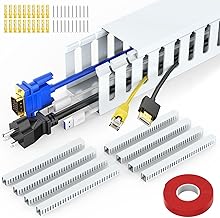
So if sleeves are bad, what do you do? You manage cables based on their function. Segregate high-power cables (laptop charger, monitor power brick, PC PSU cables) from data cables. High-power cables should have breathing room. Use vertical cable trays or raceways that mount under the desk—these are open-channel designs that hold cables in place but expose them to air. For data cables, lightweight adhesive clips or even simple hook-and-loop ties applied loosely are fine. The goal isn't a perfect cylinder; it's preventing tangles while maintaining air gaps. Based on widespread user feedback, switching from tight sleeves to open raceways drops perceived cable bundle temperatures noticeably.
Our Top Pick: The Only Safe "Bundling" Solution
After testing numerous options, one category stands out for combining safety and order: open-slot wiring raceways. These are essentially plastic or metal channels you mount underneath your desk. Cables lay inside, but the top is open or has a removable cover, allowing heat to escape. They physically separate cables from each other and your legs, and they don't constrict. This is the real issue with sleeves: constriction. A raceway organizes without compression.
Common Mistakes You're Probably Making Right Now
- Sleeving Your Power Strip: This is the cardinal sin. Power strips generate heat from internal resistance and transformer hum. Wrapping them in anything is asking for trouble. Leave them in the open, preferably on a non-flammable surface.
- Mixing Cable Types: Bundling a low-power USB 2.0 mouse cable with your 140W laptop charger is like putting a spark next to kindling. The charger cable will heat up and transfer that heat directly to the thinner-insulated mouse cable.
- Ignoring the Feel Test: If your cable bundle is warm to the touch after 30 minutes of normal use, your management solution is failing. It shouldn't be. Persistent warmth is a warning sign of insufficient heat dissipation.
Final Verdict: Skip It
The aesthetic cable sleeve trend is overrated and carries a real, albeit small, risk that is completely unnecessary. The marginal visual benefit isn't worth the thermal compromise. In 2026, with power delivery standards pushing more watts through thinner cables, managing heat is more critical than ever. Skip the sleeves for any cable that carries significant current. Invest instead in open-air management solutions like raceways and clips. Your desk might look slightly less "finished" to a photographer, but it won't be a fire hazard. That's a trade-off any engineer would take.
For more on managing your desk's hidden dangers, read about USB C Dock Overheating Masterclass: The 2026 Brutal Truth and why Reusable Cable Ties Are an Overrated Gimmick.
Frequently Asked Questions
Are all cable sleeves a fire hazard?
Not all, but most popular braided sleeves used for bundling multiple power cables create a significant risk. They trap heat from power supplies, chargers, and high-wattage cables, which can degrade insulation and, in extreme cases, lead to melting or fire. Single-cable sleeves on low-power accessories are less risky but still inhibit cooling.
What temperature is unsafe for sleeved cables?
If the sleeve itself is consistently warm to the touch (above 40°C / 104°F) during normal use, it's a sign of poor heat dissipation. Internal cable temperatures can be much higher. Most plastic cable insulations start to degrade above 70°C (158°F). A tight sleeve can easily push bundled cables into this range.
What's the safest way to manage desk cables in 2026?
Use open-air solutions. Under-desk cable raceways or trays with ventilation slots are ideal. Keep high-power cables separated from each other and from data cables. Use loose, non-constricting hooks or clips instead of tight wraps. Never sleeve power strips or charging bricks.
Do 'fire-retardant' sleeves exist?
Yes, but they're rare in the consumer cable management market. Look for sleeves rated with standards like UL 94 V-0. However, even a fire-retardant sleeve still traps heat, which remains the primary problem—it can prevent a fire but still cause cable damage and device failure from overheating.
I have sleeved cables now. What should I do?
Remove the sleeves from any cables that feel warm during use, especially laptop chargers, monitor power cables, and PC power supply cables. Inspect the underlying cables for any signs of softening, discoloration, or cracking. Re-route these cables using open channels or clips to ensure air can flow around them.

Written by
Amanda hates visible cables. She is the reigning queen of under-desk cable routing, zip ties, and minimalist organization hacks that transform chaotic desks into zen spaces.
Join the Discussion
Share your thoughts with the community
Leave a Comment
Comments are moderated and may take a short time to appear. Links are not permitted.