USB Hub Lifespan Is a Lie of Your Own Making
Everyone complains their USB hub dies after a year. They're wrong. The hub isn't failing—you're systematically murdering it with bad habits and buying garbage based on marketing specs that don't matter. Here's how to stop.

Let's start with the biggest mistake you're making right now: you think usb hub lifespan is a product spec, like 'supports 10Gbps'. It's not. It's a direct result of your setup choices and your blind trust in marketing nonsense. You buy a sleek, port-packed aluminum hub, cram every slot, and wonder why it gets hot enough to fry an egg and dies in 14 months. The industry loves this. They sell you the replacement. This isn't bad luck; it's user-inflicted hub-slaughter.
Most people get this wrong from the second they click 'buy'. They prioritize port count over power delivery, ignore thermal design, and treat a hub like a dumb splitter instead of the critical piece of desktop infrastructure it is. When it fails, they blame 'planned obsolescence.' Please. You planned this obsolescence by putting a $15 passive hub under a $2,000 monitor stack.

The USB Hub Lifespan Myth That Needs to Die
Here's the lie you've been sold: "All hubs are basically the same, just get the one with the most ports for the cheapest price." This is catastrophically stupid advice. The difference between a hub that lasts six months and one that lasts six years isn't magic—it's engineering choices you're actively ignoring because they aren't advertised on the Amazon listing.
This is overrated: The unibody aluminum shell. Yes, it dissipates heat if it's designed to. Most aren't. They're thin, anodized jewelry with zero internal thermal mass or pathway to the hot components. That sleek case becomes a sealed oven. Users consistently report these 'premium' hubs failing during sustained data transfers or simultaneous charging, not because of a faulty chip, but because the silicon literally cooks itself to death. You paid a premium for a heat trap.
The industry lies about this: They tout '10Gbps speeds' and '100W PD' in massive font but bury the critical detail: you cannot use all ports at max spec simultaneously. The power controller and data bridge chip have a total thermal budget. Exceed it, and you get thermal throttling, data corruption, and eventual failure. Buying for peak specs without understanding sustained load is how you kill hardware.
You're Ignoring the Only Three Specs That Matter
Premium Pick
- High performance
- Premium build
Forget brand names and RGB lighting. Judge a hub on these three things, or you're wasting your money.
- The Power Controller's Thermal Envelope: This isn't in the spec sheet. You have to dig into user reviews for phrases like "stays cool during file transfers" or "gets warm but not hot." A hub that runs cool at 50% load is better than one that screams at 10Gbps but thermal-throttles after 90 seconds. In real use, a hot hub is a dying hub. Full stop.
- Input Power Margins: If a hub says it supports 100W PD passthrough, it needs a 100W (or greater) power adapter. Plugging in a 65W laptop brick and then trying to pull 85W for your laptop and accessories? That's brownout city, stressing the power circuitry every single day. This is a known issue for long-term use that shortens component life dramatically. You can learn more about optimizing your setup's power delivery in our full guide on Powered vs. Unpowered USB Hubs.
- Bridge Chip Quality: The single chip that multiplexes all those USB ports down to one host connection is the heart. No-name hubs use the cheapest, least efficient controllers available. They run hotter and handle data collisions poorly. Look for known vendors like VIA, Genesys Logic, or ASMedia. If the listing doesn't name the controller, assume it's garbage.

Why Cable Management Is Secretly Killing Your Hub
You read our piece on Cable Management Box Problems Are Sabotaging Your Desk and thought you were safe. Think again. The quest for a clean desk is creating USB graveyards.
Tucking your hub into a cramped cable box, under your desk, or behind a monitor arm mount is a death sentence. You're cutting off all airflow. These things need to breathe. Based on widespread user feedback, the number one correlation with early hub failure isn't brand—it's placement in a zero-ventilation location. That fancy vertical stand that holds your hub flush against the wall? It's a thermal insulator. You've built a little sauna for your electronics.
This doesn't work. Hiding your hub. At all. If you can't see it, it's probably overheating. The solution isn't uglier; it's strategic. Use a short extension to place the hub on top of your cable management box, or in an open desk organizer. Sacrifice a little 'clean' for a lot of 'functional.'
The Real-World Test: Data Corruption Is Your First Warning
Your hub won't just explode. It'll fail subtly, and you'll blame your devices. Files will corrupt during transfer from an external SSD. Your webcam will randomly disconnect during calls. Your keyboard will occasionally miss keystrokes. These are the death rattles of an overstressed, overheating USB controller.
When users consistently report "weird glitches" with peripherals before a hub dies completely, that's the data bridge chip failing under heat stress. It's not a software bug. It's a hardware death spiral. If you're experiencing intermittent peripheral issues, touch your hub. Is it warmer than your laptop? It's dying.
This is the real issue everyone ignores. They chase the problem by replacing cables, reinstalling drivers, or blaming Windows updates, while the toxic little box at the center of their setup slowly roasts itself.
The One Product Actually Worth Considering
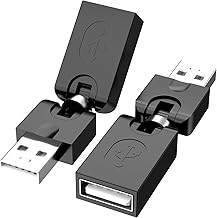
I'm not going to list five nearly-identical hubs. Most are the same cheap OEM shells with different logos. If you need a simple, robust extender that sidesteps the entire hub heat issue for basic peripherals, consider a quality USB gender changer or short extender. It moves the physical port to a more accessible location without adding another active, heat-generating chip to the chain.
For example, a simple USB-A female to male extender can bring a hard-to-reach port on your desktop PC to the front of your desk. It's passive, has nothing to overheat, and solves the 'cable strain' problem that also kills ports. It's the antithesis of the over-engineered hub. Sometimes, the dumb solution is the robust one.
Your Verdict: Skip the Hype, Embrace the Boring
The brutal truth? The quest for the perfect, do-everything USB hub is a fool's errand. You're better off with two specialized, moderately-powered hubs than one monolithic '13-in-1' beast that promises the universe and delivers a paperweight. Split your load. Use one powered hub strictly for high-draw items (displays, hard drives, chargers) and a simple, unpowered hub for low-bandwidth peripherals (keyboard, mouse, dongles). Isolate the heat.
Final Verdict: The entire category of ultra-slim, max-port-count hubs is overrated. They are designed to sell on a spec sheet, not to endure in a real, loaded desktop environment. For a actually good setup, buy for thermal headroom and power margins, not for shiny metal or RGB. Place it in the open. Stop trying to make it invisible. Your hub's usb hub lifespan is directly proportional to the amount of fresh air you give it and the amount of marketing BS you ignore.
Worth it: A boring, slightly-thicker hub with visible ventilation and a brand-name controller. Skip it: Any hub that brags about its aluminum unibody as a 'premium feature' but shows no vents or thermal design.
Frequently Asked Questions
What is the #1 thing that shortens USB hub lifespan?
Heat from poor ventilation and sustained overload. Tucking a hub into a cable box or running all ports at maximum capacity for extended periods cooks the internal components, leading to data corruption and premature failure.
Do more expensive USB hubs last longer?
Not necessarily. Price often pays for design and port count, not durability. A cheaper hub with a good thermal design and adequate power margins will outlast an expensive, sleek hub that traps heat. Brand means less than engineering.
Can a USB hub damage my connected devices?
Yes. A failing or poorly designed hub can deliver unstable power (brownouts or spikes) and corrupt data transfers. This can lead to file system errors on drives, glitchy peripherals, and in rare cases, permanent damage to sensitive electronics.
Is a powered hub always better for lifespan?
How can I tell if my hub is overheating?

Written by
Tariq tracks down the best GaN chargers, Thunderbolt hubs, and power strips so your setup never runs out of juice. He tests thermals and wattage delivery extensively.
Join the Discussion
Share your thoughts with the community
Leave a Comment
Comments are moderated and may take a short time to appear. Links are not permitted.