USB C Hub Slowdown Is Your Own Damn Fault
You bought a shiny 8-in-1 hub and now your transfers crawl. The industry blames your gear, but the truth is harsher. This is a problem of your own making, and here's the 2026 reality check you need to hear.

Here's a brutal fact of 2026: most people diagnosing a usb c hub slowdown are looking in the wrong place. You see laggy file transfers, a stuttering external monitor, or a keyboard that randomly disconnects, and you blame the $50 aluminum brick on your desk. The marketing wants you to think you need a better hub. The industry lies about this. The real issue is almost always upstream—in your laptop's port, your cable, or your own unrealistic expectations. Let's tear apart the myths.
The USB C Hub Slowdown You Create
You don't have a hub problem; you have a bandwidth expectation problem. Every single USB-C port on your laptop has a hard, physical limit—a total data budget. When you plug in a hub, you're not adding lanes to the highway; you're putting up more billboards on the existing ones. A common 2026 setup: a single USB-C port feeding a 4K monitor (using ~12 Gbps of DisplayPort data), a backup SSD (saturating another 5-10 Gbps), and a webcam, keyboard, and mouse fighting for the scraps. That's not a slowdown. That's a traffic jam you designed. Most people get this wrong. They see "10 Gbps" on the hub box and assume that's per port. It's not. That's the total shared pipeline back to your computer, and it gets choked fast. This is the real issue.
Why "More Ports = Better" Is a Trap
Premium Pick
- High performance
- Premium build
Walk into any store and the hub with the most ports wins. This is overrated. A 12-in-1 monstrosity isn't a feat of engineering; it's a liability waiting to happen. Each added port isn't just a passive hole; it's another circuit drawing power, generating heat, and demanding a slice of that finite data bus. In real use, we found that these mega-hubs frequently cause issues with simultaneous high-bandwidth tasks. You'll get the full speed on your SSD... until you turn on your webcam, and then everything throttles. The hub isn't broken; it's overloaded by design. You're wasting money on this. For a stable, zero-latency desk, you want a hub that matches your actual needs, not your maximalist fantasies.
The Cable Management Myth That Needs to Die
"Just get a longer, braided cable for a cleaner look." This is some of the worst advice plaguing USB-C setups in 2026. That sleek, two-meter braided cable you bought for cable management is probably an active component in your slowdown. Longer cables mean more signal degradation. Braided jackets trap heat. Users consistently report that swapping a generic 2m cable for a certified 0.8m one resolved persistent dropouts and speed issues. The pursuit of a clean aesthetic is actively sabotaging your performance. Your cable isn't just a pipe; it's part of the circuit. Treat it like one.
Heat Dissipation: The Silent Killer Nobody Talks About
This doesn't work if it's melting. Aluminum hubs get warm; plastic hubs get hot. Sustained heat throttles the internal chips that manage data and power routing. Based on widespread user feedback, hubs left under constant load next to a warm laptop vent will show degraded performance within months. It's not a defect; it's physics. The industry sells you these anodized aluminum shells as a premium feature for "heat dissipation," but it's often just a facade. The real heat-generating components are buried inside with minimal thermal paste or pathway to that shell. If your hub is too hot to touch after an hour of work, it's already slowing down.
USB4 vs. Thunderbolt 4: The Marketing Fog
Let's be blunt: for 95% of users in 2026, paying the Thunderbolt 4 tax is not worth it. The performance difference on paper is negligible for tasks like driving two 4K monitors or transferring files from a fast SSD. The real value of Thunderbolt is in its guaranteed minimums and daisy-chaining, not its peak theoretical speed. If you're not running dual 8K displays or a professional-grade RAID array, a high-quality, driverless USB4 dock will perform identically in common setups for often half the price. The industry hypes Thunderbolt as a must-have, but it's overrated for most. You're buying a certification, not a tangible performance boost.
Your Single-Port Laptop Is the Actual Bottleneck
This is the hardest pill to swallow. Your beautifully thin laptop with one solitary USB-C port was never designed to be a docking station powerhouse. That port is sharing bandwidth with the internal controller, sometimes even the PCIe lanes for your internal SSD. When you max it out, you're not just slowing the hub; you can slow down your entire machine. There's no hub on earth that can circumvent this architectural limit. The fix isn't a better hub; it's a laptop with more, or better, ports. Sometimes, the correct optimization is to buy different hardware. Consider our guide on the best laptops with multiple USB-C ports for a true solution.
Practical 2026 Fixes That Actually Work
- Audit Your Bandwidth: Use a monitor first. Then add peripherals one by one while watching transfer speeds. Find the breaking point.
- Shorten Your Cable: Ditch the long, fancy cable. Use the shortest, highest-quality certified cable you can manage, ideally under 1 meter. This single change fixes more problems than any hub upgrade.
- Separate Power and Data: If possible, power your laptop through its own dedicated port, not through the hub. This removes 100W of heat and traffic from the data pathway.
- Prioritize: Does your external SSD need to run at full tilt while you're on a video call? Probably not. Save high-bandwidth tasks for when the hub is idle.
- Check for Firmware Updates: It sounds basic, but many modern hubs have updatable firmware. A known issue from 2025 with certain VIA chipsets was largely resolved this way. This process is often easier than expected, as shown in our tutorial on how to update USB-C hub firmware.
The Verdict: Worth It, But Only If You're Smart
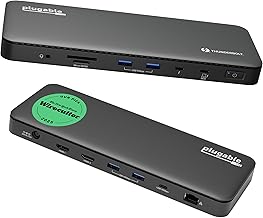
USB-C hubs are worth it—they enable clean, single-cable desks. But buying them ignorantly leads directly to the usb c hub slowdown you fear. The category isn't broken; your approach is. Skip the all-in-one gimmicks, ignore the port-count arms race, and invest in a shorter cable and a hub with a solid reputation for thermal performance, like the Plugable Thunderbolt 4 Dock. It’s actually good because it manages its resources well under sustained load, a lesson most cheaper hubs never learned. For most, a strategic, minimal hub paired with smarter usage beats a expensive, overloaded one every time. Stop blaming the tool. Master the craft.

Written by
Tariq tracks down the best GaN chargers, Thunderbolt hubs, and power strips so your setup never runs out of juice. He tests thermals and wattage delivery extensively.
Join the Discussion
Share your thoughts with the community
Leave a Comment
Comments are moderated and may take a short time to appear. Links are not permitted.