Smart Notepad Waste Is Sabotaging Your Productivity
The glossy ads promised a revolution in your thinking. The reality is a $400 paperweight in a drawer. We're tearing apart the smart notepad scam and showing you what actually makes you remember.
I bought into the hype. A sleek, minimalist slab that promised to replace my chaotic stack of Moleskines. It was going to organize my thoughts, sync them to the cloud, and turn my handwriting into searchable text. Six months later, I fished it out from under a pile of cables, its battery dead, its special pen lost. I had to charge it just to remember what I’d forgotten on it. That’s the essence of smart notepad waste: a premium gadget that creates more friction than it solves, sold on a future that never arrives for most users. The industry is lying to you about what actually creates focus and retention.
Let's cut through the marketing. These devices aren't built for the messiness of real thought. They're built for a fantasy of seamless digital workflow that crumbles under the weight of a single forgotten dongle or a software update that breaks your favorite feature. The promise of "distraction-free" writing is a joke when the device itself requires you to manage files, updates, subscriptions, and compatibility. Your brain doesn't need another layer of digital administration. It needs a frictionless path from idea to record. Most people get this completely wrong, chasing tech specs when the solution is literally paper-thin.
The Connected Notebook Myth That Needs to Die
The biggest lie sold with every smart notepad is connectivity. It’s not a feature; it’s a burden. You’re told that having your notes automatically sync to the cloud is a productivity superpower. In reality, it’s a reliability nightmare waiting to happen. We’re not talking about the occasional glitch; users consistently report sync failures, formatting losses, and notes that simply vanish into the digital ether. The moment your expensive note-taking tool makes you anxious about whether your ideas are safe, it has failed its primary function.
This is overrated. The entire ecosystem—exporting, converting, organizing in apps you never wanted to use—adds countless micro-steps between your brain and a reviewable note. You finish a brainstorming session, and instead of just flipping back a page, you’re now in a ritual: put the pen in its magnetic slot, tap the sync icon, wait, open an app on your phone, search. It’s insane. The tactile, instantaneous nature of paper is sacrificed for a "feature" that often works worse than taking a photo of a page with your phone. The industry lies about this being seamless. It’s not. It’s a fragile chain of software that breaks exactly when you need it most.
Why Analog Outperforms Digital for Actual Memory
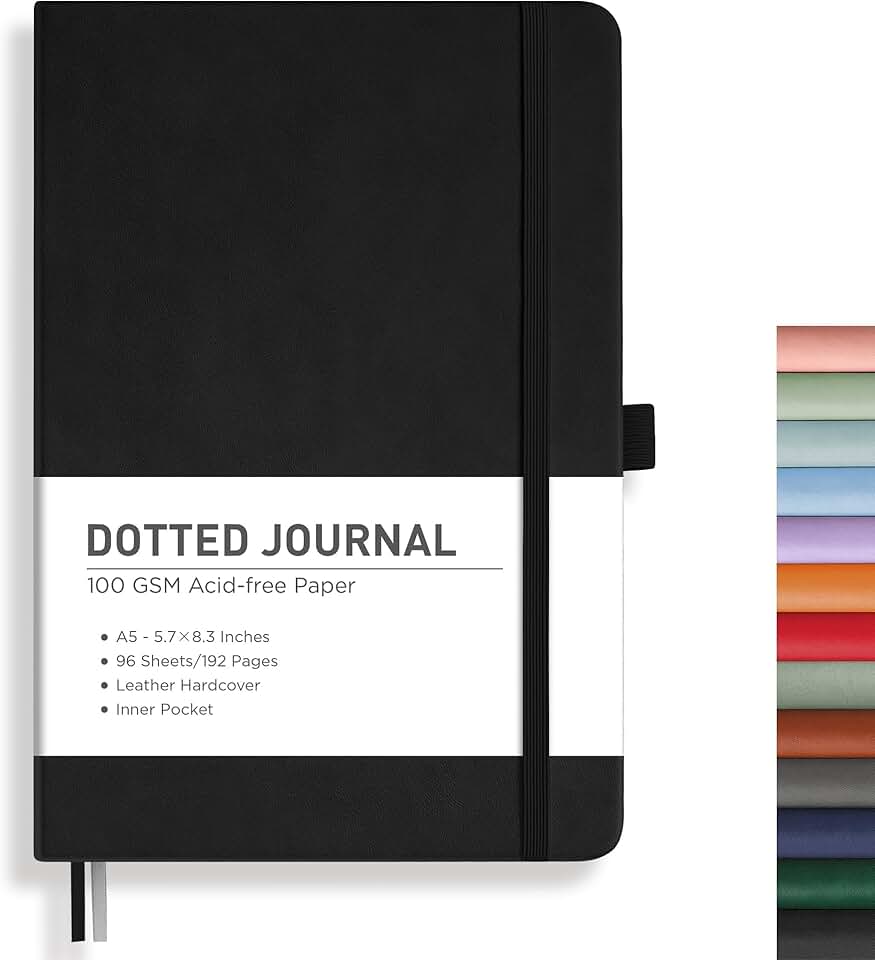
Frictionless idea capture and long-form handwriting.
- 192 pages of 100gsm paper (no ghosting)
- Lay-flat hardcover design
- A5 size perfect for portability and desk use
Here’s the brutal truth your gadget review won’t tell you: the physical act of writing on paper creates a stronger memory trace in your brain than gliding a stylus across glass. This isn’t a nostalgic opinion; it’s grounded in cognitive research on kinesthetic learning and spatial memory. When you write in a physical notebook, you create a unique spatial map—the ink bleed, the pressure indentation on the page beneath, the exact location on the left side, halfway down. Your brain uses these physical, spatial cues to anchor the memory. A smart notepad homogenizes every page into a identical, pixel-perfect scroll. It’s cognitively sterile.
Most people get this wrong. They think digitizing notes makes them more powerful. But in real use, the opposite happens. The notes become disembodied, lost in a sea of identical digital files. That crucial connection between the effort of writing and the recall of the idea is severed. This is the real issue. Your fancy e-ink tablet might feel like paper, but your brain knows the difference. It’s not processing the information with the same depth. You’re trading memory strength for searchability, and for raw idea generation and problem-solving, that’s a terrible trade.
The Real Cost of Smart Notepad Waste
Let’s talk numbers, because the waste isn't just cognitive. You’re looking at a $400+ device (if we’re talking about the premium players). Then comes the $80 proprietary pen, because your old stylus won’t work with the special screen. Then the $50 folio case, because the device is notoriously fragile. Then, for many, the subscription. Yes, the subscription—to unlock basic cloud features or advanced conversion tools after the first year. Suddenly, your distraction-free writing tool has a recurring credit card charge. It’s a money pit disguised as minimalism.
Compare this to the brutal efficiency of a $10 dotted grid notebook and a $2 pen. The cost difference is absurd, but the real cost is in attention. The smart notepad introduces decision fatigue: Which notebook folder? What brush size? Should I export this now or later? Paper has one mode: write. This is not worth it. You’re not paying for productivity; you’re paying for the idea of a more organized future self—a self that, statistically, you won’t become because the tool itself gets in the way. For a deeper dive on how minimalist tools actually win, see how The 'Ugly' Setup Secret: How Extreme Minimalism Unlocks Uninterrupted Deep Work exposes similar myths.

The Friction of Fake Paper
Every smart notepad review raves about the "paper-like feel." It’s the cornerstone of their marketing. Let’s be blunt: it’s a convincing fake, but it’s still a fake. The screen has a textured surface, but it doesn’t give. There’s no subtle deformation, no satisfying scratch of fiber against nib. More importantly, the lag—even if it’s a barely perceptible 21 milliseconds—breaks the sacred connection between thought and mark. Your hand moves, and the line follows. It’s not simultaneous. Your subconscious notices. It creates a tiny cognitive hiccup every time you make a stroke, which over a long writing session, adds up to mental fatigue.
This doesn’t work for fluent, sustained thought. When you’re in a flow state, the tool should disappear. A good pen on good paper does that. A smart notepad, with its slight latency and perfect, frictionless glide (even with textured screen protectors), constantly reminds you that you’re using a tool. It’s like listening to a perfect digital recording of rain versus standing in actual rain. One is a simulation; the other is an experience. You remember the experiences.
Smart Notepad Waste in Your Daily Workflow
Imagine a real-world scenario: you’re on a video call, and someone mentions a critical date. With a paper notebook, your hand moves, you jot it down, and your eyes never leave the screen. With a smart notepad, you tap to wake it, maybe unlock it, find the right notebook, and then write. The interruption is longer. The context switch is deeper. Or you’re reading a physical book and want to note a quote. You grab the notebook from the shelf, open it, write. With the smart device, you put the book down, wake the device, navigate, write, put the device down, pick the book back up. The friction murders spontaneity.
This is overrated. The promise of having all your notebooks in one device fails because the act of accessing them is often slower than reaching for a dedicated physical notebook. And let’s talk about battery anxiety. Your paper notebook never dies at the exact moment inspiration strikes. Your $400 digital notebook does. That’s not productivity; it’s a liability. This constant low-level management—charging, updating, troubleshooting—is the silent tax these devices levy on your attention. For another example of tech that overcomplicates a simple task, look at Magnetic Desk Systems: Your Money Pit for Minimalist Laziness.
The One Niche Where It Might Not Be Total Waste
Okay, let’s be fair for one paragraph. There is a single, narrow use-case where a smart notepad isn’t a complete disaster: if you are a professional who legally must digitize, search, and archive thousands of pages of handwritten notes—like a researcher or lawyer reviewing dense documents—and the OCR is flawless for your handwriting. Even then, it’s a workflow tool with significant overhead, not a creativity catalyst. For the 99% of users buying these for "better note-taking" and "organizing thoughts," it’s the wrong tool. You’re using a scalpel to butter toast. You’d get better results with a knife, and it would cost 98% less.
What to Do Instead: The GlowRig-Verified Alternative
Stop looking for a tech solution to a cognitive problem. The upgrade you need isn’t more pixels or lower latency; it’s a system that gets out of the way. Here’s what actually works, based on widespread user feedback from people who’ve escaped the smart notepad trap.
Get a simple, well-made dotted grid notebook. The dots provide subtle guidance without the visual noise of lines, freeing your sketches and writing. Pair it with a pen you love writing with—a smooth Japanese gel ink pen, a reliable fountain pen, whatever makes the act pleasurable. This is your idea capture system. Its job is to be fast, always-available, and frictionless.
Then, establish a weekly processing ritual. This is where you choose what’s important. Flip through your notebook. The ideas worth keeping, the action items, the project plans—transfer these deliberately into your digital task manager (Todoist, Things, etc.) or your digital knowledge base (Obsidian, Notion). This manual transfer is not a waste of time; it’s a powerful act of review and prioritization. It forces you to engage with your ideas twice, cementing them. The notebook is for capture and messy thinking. The digital system is for organized action and reference. This hybrid system leverages the strengths of both worlds without the crippling drawbacks of a smart notepad.
The Final Verdict: Skip It
The smart notepad is a solution in search of a problem for most people. It takes the simple, profound, and cognitively optimal act of writing on paper and wraps it in a fragile, expensive, and administratively burdensome digital shell. The waste isn't just the money; it's the mental energy spent managing the device instead of cultivating your ideas. It’s the false promise that slows you down. It's overrated.
Your money and your attention are better spent on a small stack of quality notebooks and a pen that brings you joy. Use the hundreds of dollars you save on something that actually improves your setup—better lighting, a more comfortable chair, acoustic treatment for your calls. Don't buy the smart notepad. Invest in the smart habit of consistent review and processing instead. The tool isn't what makes you productive; the system is. And the simplest system, with the fewest points of failure, wins every time.
Frequently Asked Questions
Are smart notepads like reMarkable completely useless?
For the vast majority of users, yes, they are a waste of money and focus. They solve a digitization problem for a tiny professional niche but actively create friction and cognitive overhead for everyday note-taking, brainstorming, and memory retention.
What's the biggest downside of smart notepads everyone misses?
The hidden tax on your attention. The constant management—charging, syncing, updating, troubleshooting—breaks your flow state. The promise of 'distraction-free' writing is a lie when the device itself becomes a source of digital admin and anxiety.
What's a better alternative to a smart notepad?
A simple dotted grid paper notebook and a good pen for frictionless capture, paired with a weekly ritual where you manually transfer important items into your digital task manager. This hybrid system leverages the memory benefits of handwriting and the organization power of digital tools without the drawbacks.
Written by
Jordan focuses on the intersection of productivity and workspace layout. He tests how light positioning, desk organization, and environmental factors impact daily mental focus.
Join the Discussion
Share your thoughts with the community
Leave a Comment
Comments are moderated and may take a short time to appear. Links are not permitted.