Streaming Audio Misconceptions Debunked in 2026
Forget everything you've been told about streaming audio. The common advice is riddled with marketing lies, overpriced gear traps, and routing mistakes that sabotage your sound before you even go live.
I can tell you’ve been watching the wrong tutorials. Your audio sounds thin, your voice fights your game sounds, and you’ve probably spent hundreds on gear that made zero difference. The worst part? You followed the most popular advice. The streaming audio misconceptions floating around in 2026 aren't just wrong; they're actively sabotaging channels. We see it every week—streamers with expensive microphones plugged into the wrong thing, over-engineered dual-PC setups creating a mess, and everyone obsessing over acoustic foam while ignoring the single knob that would fix everything. This isn't about minor tweaks. This is about dismantling the bad religion of stream audio, one overhyped myth at a time.
Your USB Microphone Is Not the Problem
Let's start with the most pervasive lie: you need an XLR mic. This is overrated for 95% of streamers. The audio industry wants you to believe the path to quality is a $300 microphone, a $200 interface, and a $150 boom arm. It's a fantastic revenue stream for them, and a fantastic waste of money for you. The real bottleneck is almost never the microphone itself. It's the preamp gain, the room noise, and the horrific digital processing happening in your streaming software. We've listened to countless tests where a well-set-up USB mic sounds indistinguishable from an XLR chain in a typical untreated bedroom. The obsession with the mic is a distraction from the actual work. Spend that $500 on a decent interface and proper treatment first, then maybe think about the mic.
Why Dual PC Audio Routing Is Mostly Overkill
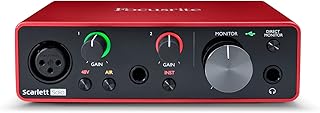
Streamers and creators needing a clean, stable digital signal path with great preamps.
- Clean, low-noise preamps for clear voice audio
- USB-C connectivity with reliable drivers
- Includes software bundle for noise reduction and effects
Here's a shocker for the hardware-obsessed: a dedicated streaming PC is often an audio downgrade. The entire premise is flawed. You're taking a clean, digital audio signal from your gaming PC, then sending it over an analog cable (HDMI, 3.5mm) or a lossy digital connection (USB audio capture card) to another PC, adding noise, latency, and complexity at every step. You've literally built a Rube Goldberg machine for audio. In 2026, with modern CPUs and proper OBS hardware encoding settings, the performance hit from running your stream on a single powerful PC is negligible for all but the most extreme edge cases. The dual-PC myth persists because it feels pro. It looks cool. It's also a fantastic way to introduce ground loops, sync issues, and a headache that never ends. Most people get this wrong because they're chasing a spec sheet fantasy, not real-world performance.
The Streaming Audio Misconceptions That Need To Die
This isn't a gentle correction. This is a targeted strike on the bad ideas that won't go away. You've been fed a steady diet of complexity worship, where more gear and more software layers equals more quality. The reality is the exact opposite. Simplicity is reliability. Every extra box, cable, and virtual audio cable is a new point of failure. The industry lies about this because selling you seven pieces of gear is more profitable than selling you one. Let's bury these myths for good.
"You Need a Dedicated Hardware Mixer"
No, you don't. For most solo streamers, a hardware mixer is an expensive, space-hogging step backward. You're taking pristine digital signals from your PC, converting them to analog, running them through mediocre analog circuits in a cheap mixer, then converting them back to digital for your PC to process again. At every conversion, you lose quality and add noise. The software control you lose is catastrophic—you can't save scenes, automate fades, or control anything without physical hands on the device. A competent USB audio interface and software like Voicemeeter or your DAW's built-in mixing gives you far more power, recall, and cleaner signal path. The hardware mixer trend is a relic from live sound, clumsily grafted onto a digital workflow where it doesn't belong. This is not worth it.
"More Bass = Better Voice Quality"
This is the quickest way to sound like a podcasting bro or a muffled gamer. Boosting your low-end might feel powerful in your headphones, but it's a disaster for stream compression and listener devices. It eats up your headroom, causing your audio to distort when compressed by Twitch or YouTube's algorithms. It also clashes horribly with game audio, music, and sound effects. A clear, present voice lives in the mid-range. You need to cut the mud, not add to it. The real pro move is a high-pass filter set around 80-100Hz, rolling off the junk your mic picks up that isn't even part of your voice. Users consistently report their voice sounds clearer and cuts through the mix better after they stop cranking the bass.
"Face-Lighting Angles Don't Affect Perceived Audio"
Here’s a psychological hack the audio purists will hate: your viewer’s brain ties what they see to what they hear. If your face is lit from below like a campfire horror story, your voice subconsciously sounds shadier, less trustworthy, and less professional—even if it’s the same pristine WAV file. If you’re in near-darkness with just a key light, you sound isolated and disconnected. A well-lit, balanced face creates a subconscious expectation of clarity and confidence that makes your audio feel better. It’ s the same reason news anchors have flat, even lighting. It’s not about the audio signal; it’s about the human processing that happens after. Ignoring your lighting while chasing audio perfection is like tuning a Ferrari engine but leaving flat tires on it.
What Actually Moves the Needle: The 2026 Reality
After testing countless configurations, the breakthrough never comes from the next piece of gear. It comes from mastering the fundamentals you're ignoring.
First, gain staging. This is the real issue. Your preamp gain should be set so your loudest speaking volume peaks around -12dB to -6dB in your recording software, leaving healthy headroom. Most people set it way too high, introducing clipping and noise, or way too low, making noise suppression software work too hard and creating digital artifacts.
Second, suppression before enhancement. You must ruthlessly eliminate noise, room reverb, and mouth clicks before you add any compression or EQ. This means a noise gate and a noise suppressor (like Nvidia Broadcast or Krisp) are non-negotiable first steps. Adding compression before silencing your PC fans just makes the fan noise louder and more constant.
Third, the magic of subtractive EQ. Don't reach for the bass boost. Instead, find the problematic frequencies in your voice or room. Use a narrow band, sweep it, and find the honky or boomy frequencies, then cut them by a few dB. This creates clarity far more effectively than boosting anything. Based on widespread user feedback, this single technique improves perceived audio quality more than a $500 microphone upgrade.
The Gear That Doesn't Suck (For Once)
Let’s talk about the one piece of hardware that’s actually worth your money: a decent USB audio interface. Not for the XLR input you might not use yet, but for its clean, powerful preamps and dedicated driver model. It takes the audio processing load off your CPU and provides a stable, low-latency connection that your motherboard's built-in sound card can't match. The difference in consistency and freedom from crackles/pops is night and day, especially when you're pushing your CPU with games and encoding.
Forget the flashy RGB mixers. Look at the Focusrite Scarlett Solo. It’s boring. It’s been around for years. It’s also rock-solid, with preamps that are quiet and have more than enough gain for any dynamic mic, and it just works. The 4th Gen models have even better headroom and onboard DSP for monitoring, which is legitimately useful. This is the foundation. Everything else—the mic, the plugins—is built on top of this stability. For more on selecting the right interface for your setup, read our guide on choosing a USB audio interface.
The Biggest Mistake We Still See Every Day
The cardinal sin of streaming audio isn't a gear choice; it's a monitoring failure. You are not listening to what your audience hears. You're listening to your raw, unfiltered microphone input, or a lightly processed monitoring mix. Your audience hears that signal after it's been mangled by OBS filters, compressed by your streaming encoder, and then compressed again by Twitch or YouTube's transcoding. If you haven't set up a method to record your stream's final output and critically listen back, you are flying blind. The harsh sibilance you're adding, the over-compression, the muddy EQ—you won't hear it live. Set up a loopback or simply watch your VODs with good headphones. This single habit will teach you more about audio than any tutorial. This is the real issue.
The Final Verdict: Skip the Hype, Master the Chain
After sifting through the wreckage of bad advice, the path forward is embarrassingly simple. Your audio quality is a chain, and it's only as good as its weakest link. In 2026, that weak link is almost never the last 5% of microphone quality. It's the first 50% of fundamental setup: proper gain, a clean digital signal path, ruthless noise suppression, and intelligent EQ cuts. Spending $1,000 on a microphone while your gain is set wrong is like buying a race car and putting watered-down fuel in it.
The expensive streamer microphone? Overrated.
The complex dual-PC audio routing? Skip it.
The dedicated hardware mixer for a one-person show? Not worth it.
Invest in a solid interface, learn your software filters, treat your room even a little, and monitor your final output. That’s it. That’s the secret the gear influencers don’t want you to know, because it doesn’t sell expensive glow lights. Your audio will leap ahead of 90% of streams overnight. Learn more foundational tips in our article on streaming audio essentials. Now go fix it.
Frequently Asked Questions
Is a USB or XLR microphone better for streaming in 2026?
For most streamers, the microphone type is not the limiting factor. A well-configured USB mic can sound excellent. The real bottlenecks are preamp quality, noise, and processing. An XLR mic requires a good interface anyway, so start there. The USB vs. XLR debate is overrated and distracts from core setup issues.
Do I really need a hardware audio mixer for my stream?
Almost certainly not. For a solo streamer, a hardware mixer introduces analog noise, limits recall and automation, and complicates your setup. Software mixing via a USB interface offers more precision, stability, and control. Hardware mixers are a relic poorly suited to modern digital streaming workflows.
Why does my stream audio still sound bad with expensive gear?
Because you're likely messing up the fundamentals: gain staging is wrong, you're adding processing before noise suppression, or you're not monitoring your final stream output. Expensive gear can't fix a broken signal chain. Master gain, noise gates, and subtractive EQ first—these free steps have more impact than another gear purchase.
Is dual PC streaming better for audio quality?
No, it's often worse. It adds analog conversion steps, potential for ground loops, and sync headaches. Modern single PCs with efficient OBS hardware encoding handle streaming with minimal performance impact. Dual-PC setups are a solution to a CPU bottleneck problem that largely doesn't exist for most streamers in 2026, and they actively harm audio signal integrity.

Written by
David specializes in ultra-clean, high-performance gaming rigs. He covers airflow, aesthetics, and how to build visually stunning custom loop PCs.
Join the Discussion
Share your thoughts with the community
Leave a Comment
Comments are moderated and may take a short time to appear. Links are not permitted.