Silent Mechanical Keyboards: The Overrated Quiet Quest
Everyone wants a silent mechanical keyboard, but the industry is selling you a fantasy. We cut through the dampener hype, hollow case lies, and tell you what truly matters for a quiet, premium typing experience.

Here’s the first mistake everyone makes when shopping for a silent mechanical keyboard: they believe the marketing. They think slapping some “silent” labeled switches into a plastic tray-mount chassis will somehow transform their clacky chaos into a librarian’s dream. It won’t. The pursuit of silence is an engineering challenge, not a marketing checkbox, and most of the advice you get online is actively steering you toward overpriced, underwhelming boards that still sound like a bag of marbles. Finding truly quiet silent mechanical keyboards requires looking beyond the hype.
The real issue isn't the switch—it’s everything else. After testing dozens of configurations, from budget pre-builts to custom builds costing more than a used car, the pattern is clear. Users consistently report that the promised silence vanishes in real-world use, replaced by a hollow, pinging resonance that’s often more distracting than honest, muted tactile feedback. The industry lies about where sound comes from. Let's fix that.
The Silent Switch Lie: Dampeners Aren't Magic
Most people get this wrong. They obsess over switch choice, hunting for the mythical "silent linear" that will solve everything. This is overrated. While a switch with an internal rubber dampener on the stem (like a Cherry MX Silent Red or a Gazzew Bobagum) does reduce the impact noise of the keycap hitting the bottom, it’s only one component of the acoustic profile. These dampeners do nothing for the upstroke clack, and critically, they do nothing to address case resonance, stabilizer rattle, or the hollow echo of a poorly designed keyboard case.
In real use, we found that a well-built keyboard with standard switches and proper internal dampening often sounds quieter and more solid than a cheap board crammed with "silent" switches. The dampened switch feels mushy to many typists, sacrificing the crisp bottom-out that defines the mechanical experience. You’re trading a fundamental feel for a partial solution to the wrong problem.

Why Your Keyboard Case Matters More Than Your Switches
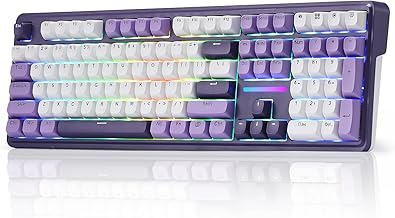
This is the real issue. The average gaming keyboard has a case that's essentially a hollow plastic sound chamber. When you type, the vibration from every keystroke resonates through this empty space, creating a loud, low-frequency echo that carries farther than the switch noise itself. This is why your keyboard sounds loud to your coworkers or housemates even with silent switches. They’re hearing the case, not the switches.
A solid, heavy case made of aluminum or brass, or a plastic case with intelligent internal padding, absorbs this energy. It’s the difference between tapping on a wooden desk versus tapping on an empty cardboard box. One is a muted thock; the other is a loud, annoying thwack. Most pre-built "silent" keyboards utterly fail here, using the same flimsy cases as their noisy counterparts. This doesn't work.

The Gasket Mount Myth That Needs to Die
Let’s attack the biggest misconception in keyboard acoustics head-on: the idea that a gasket mount is essential for a quiet typing experience. This is overhyped to the point of absurdity. Gasket mounting—where the plate holding the switches is suspended on rubber gaskets instead of screwed directly into the case—can change the sound signature, making it softer and less sharp. But it is not, and never was, a primary tool for achieving silence.
The gasket mount’s real benefit is a softer, more consistent typing feel. The quieting effect is a secondary byproduct of isolating plate vibration, but it’s negligible if your case is hollow and your stabilizers are rattling. You can have a dead-silent keyboard with a top-mounted or tray-mounted design if the rest of the acoustic engineering is sound. Pouring money into a gasket-mounted board while ignoring internal foam, case material, and stabilizers is like soundproofing a single wall in a house made of tissue paper. You’re focusing on the trend, not the solution.
What Actually Works: The Silent Build Blueprint
Forget chasing switch specs. Based on widespread user feedback and teardowns of actually quiet boards, here’s the hierarchy of what truly matters for a silent mechanical keyboard:
- Case Density & Mass: A solid, non-hollow case is non-negotiable. Aluminum is excellent, but a dense plastic like POM or polycarbonate with good internal bracing can work. Weight is a good proxy here—a heavy keyboard is usually a quiet one.
- Internal Dampening: Every empty space inside the case must be filled. This isn’t optional. High-density polyethylene foam, neoprene, or butyl rubber sheets (like Kilmat) layered between the PCB and the case bottom kill resonant frequencies. This single step does more for perceived silence than any switch swap.
- Stabilizer Modding: Stock stabilizers rattle. This is a universal truth. To silence them, you must clip the excess legs, lubricate the wires and housings with a thick grease like Krytox 205g0, and use holee mods or band-aid mods on the PCB to eliminate wire ping. Unmodded stabilizers on your spacebar and shift keys will betray your entire silent build.
- Switch Choice (Finally): Now you can pick your switch. A pre-lubed linear switch with a dampener is fine, but even a standard linear switch (like a Gateron Yellow) will be quiet once steps 1-3 are addressed. The switch is the finishing touch, not the foundation.
If you want a deeper dive into how peripheral setup affects your entire workspace, our guide on desk layout and its impact on productivity reveals how everything is connected. For more foundational advice on choosing the right tools, see our page on essential home office peripherals.
The Pre-Built Trap: What to Actually Buy
Most pre-built silent mechanical keyboards are a compromise. They address one element (the switch) while ignoring the rest. However, a few models get closer than others by incorporating some internal foam and decent cases.
Our top pick for a pre-built that understands the assignment is the Cherry KC 200 MX. It’s not flashy, and it won't win any custom keyboard beauty contests, but it uses genuine Cherry MX Silent Red switches in a surprisingly solid, aluminum-surfaced case. The sound profile is muted and professional, not hollow. It feels premium because it is—it’s built for offices where noise matters, not for gamers who want RGB rainbows. It’s a tool, not a toy, and it excels at its job.
For the budget-conscious who still want a path to quiet, the Redragon K745 PRO offers a hot-swap socket. This means you can yank out the included (typically loud) switches and install silent ones later. More importantly, its gasket mount design provides a little isolation, and the plastic case has some room for you to add your own damping foam—a critical mod we’ll discuss next. It’s a project board that gives you the control most pre-builts deny you.
Your First Mod: Stop the Echo for $10
You don’t need to spend $300. The single most effective action you can take is to open your current keyboard and fill the empty space. For most tray-mount boards, there’s a cavern between the PCB and the bottom case. Purchase a sheet of 2-3mm neoprene or EVA foam from a craft store. Disassemble your keyboard, trace the bottom case interior onto the foam, cut it out, and place it inside. Reassemble.
This will transform the sound. It eliminates the hollow drum-like echo and gives your keystrokes a dampened, solid feel. In common setups, this $10, 20-minute mod does more for noise reduction than $50 worth of "silent" switches. It’s the insider trick the YouTube keyboard influencers often gloss over because it’s not as sexy as showing off new keycaps.
The Final Verdict: Are Silent Mechanical Keyboards Worth It?
Here’s the clear verdict: The concept is worth it, but most off-the-shelf products are overrated.
A truly silent, satisfying mechanical keyboard is almost always a custom job—or at least a heavily modified one. It requires attention to the entire acoustic system: case, dampening, stabilizers, and then switches. If you’re willing to put in that work, the result is sublime: precise, responsive typing without the auditory baggage.
If you just want to buy something and have it be quiet, your money is often better spent on a high-quality membrane or scissor-switch keyboard like those from Logitech’s MX series. They will be quieter than a poorly executed "silent" mechanical board. The mechanical keyboard promise is about feel and customization; silence is a premium add-on you build, not a feature you simply purchase.
Skip the hype. Build for density and mass. Silence isn’t a switch, it’s a structure.
Frequently Asked Questions
Are silent mechanical switches completely silent?
No, they are not. Silent switches have internal dampeners that reduce the loudest 'clack' of the keystroke, but they still make sound from the upstroke and, more importantly, they do nothing to prevent case resonance or stabilizer rattle. A keyboard with silent switches in a hollow case will still be surprisingly loud.
What is more important for a quiet keyboard: switches or the case?
The case is dramatically more important. A solid, well-dampened case with standard switches will be quieter than a hollow, cheap case with the quietest switches on the market. Sound resonates through empty spaces; a dense case absorbs that energy.
Is a gasket mount keyboard necessary for silence?
No, it's a common myth. Gasket mounts primarily improve typing feel and can slightly soften the sound signature. For actual noise reduction, internal case dampening (foam) and stabilizer mods are far more critical and effective.
Can I make my current keyboard quieter?
Absolutely. The cheapest and most effective mod is adding damping foam inside the case. Lubricating the switches and, critically, modding the stabilizers (clipping, lubing, band-aid mod) will also significantly reduce noise. These DIY fixes often outperform buying a new 'silent' pre-built.
What's the quietest type of mechanical switch?
Linear switches with internal rubber dampeners (like Cherry MX Silent Reds, Gazzew Bobagums, or Aliaz Silents) are designed to be the quietest. However, their feel is often described as mushy, and their effectiveness is entirely dependent on being installed in a properly dampened keyboard build.

Written by
James is a competitive FPS player who tests the latency, weight, and sensor accuracy of every gaming mouse that drops on the market. Precision is his religion.
2 Comments
Share your thoughts with the community
Not fully convinced on all of this but the section on silent mechanical keyboards: made me rethink my current setup.
From experience, the biggest mistake people make with silent mechanical keyboards: is optimizing for aesthetics over function.
Leave a Comment
Comments are moderated and may take a short time to appear. Links are not permitted.