Smart Bulb Compatibility Problems
You didn't buy a collection of bulbs. You bought a collection of headaches. In 2026, chasing specs across brands is a fast track to app hell and a disjointed vibe. Here's the brutal truth about the ecosystem trap.
My desk looked like a smart home demo gone wrong. A Philips Hue strip behind the monitor, a LIFX bulb in the desk lamp, and a random Kasa bulb in the ceiling fixture I got on sale. Each had its own app, its own idea of "daylight white," and its own special way of dropping off the network right as my "Focus Mode" lighting scene was supposed to kick in. This isn't a niche problem; it's the standard outcome of chasing deals and specs without a plan. The core of smart bulb compatibility problems isn't about Wi-Fi vs. Zigbee—it's about surrendering control to a committee of apps that hate each other.
Most guides treat this as a technical spec hurdle to overcome. It's not. It's a design philosophy fail. You're trying to build a cohesive atmosphere—a mood, a focus aid, a visual tone—with components that were never meant to speak the same language. The result isn't just inefficiency; it's a vibe killer. Your space feels technically impressive but emotionally sterile, or worse, chaotic.
The Myth of the Universal Smart Home App
The biggest lie sold right now is the "universal" smart home platform. Apple Home, Google Home, major retailers Alexa—they promise a unified dashboard. What they deliver is a fragile translation layer. You're not controlling your bulbs; you're asking Alexa to politely request that the LIFX cloud pings your bulb, which then talks to the Philips bridge, hoping the timing works out. The lag isn't just annoying; it destroys the seamless experience smart lighting is supposed to provide. When you say "Alexa, movie time," and one bulb dims over two seconds, another snaps off, and the third does nothing for five seconds, the magic is dead. This is overrated. You're not building a robust system; you're building a house of cards reliant on every company's cloud staying up and playing nice.
Smart Bulb Compatibility Problems Start With Color Lies
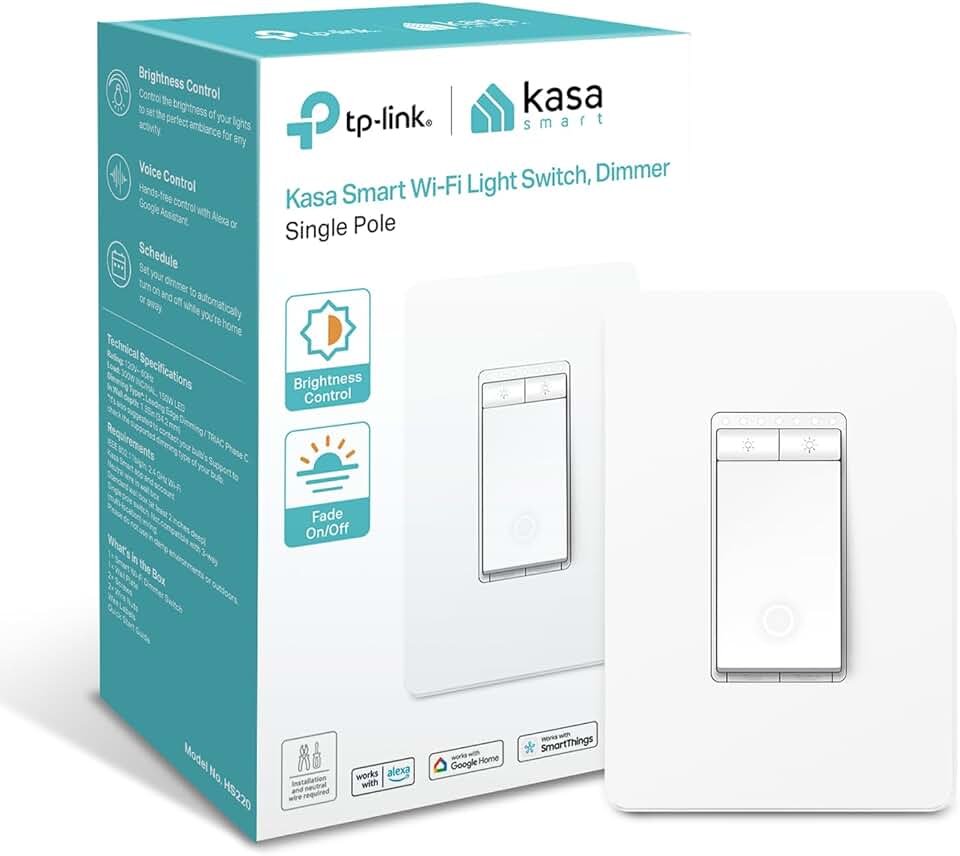
The best budget, reliable Wi-Fi smart switch for controlling dumb bulbs or fixtures.
- Direct 2.4GHz Wi-Fi (no hub needed), compatible with Alexa/Google
- Reliable scheduling and away-mode for security
- Controls multiple bulbs from a single physical switch point
Here’s a tangible, vibe-destroying truth everyone misses: color and white temperature are not standards. A "2700K warm white" from Philips Hue does not look the same as a "2700K" from Wyze or Sengled. The industry lies about this. They give you a Kelvin number but not the R9 saturation or the full spectral distribution. In real use, this means a room with mixed-brand bulbs looks sickly and disjointed, not cozy. The shadows are mismatched. The light feels clinical in one spot and muddy in another. For a desk setup where consistent, accurate light is crucial for both screen balance and video calls, this is a deal-breaker. You can't have professional lighting when your left side is green-tinted and your right side is magenta. Most people get this wrong. They think buying "daylight" bulbs is enough. It's not.
Why The Bridge Is Not Optional
Let's attack the common advice: "Skip the hub, go Wi-Fi direct to save money." This is the myth that needs to die. Wi-Fi bulbs are a plague on your network and your patience. They congest your 2.4GHz band with dozens of always-on devices, competing with your laptop and phone. More critically, they lack a local controller. Every command goes to the cloud and back. When the internet hiccups, your lights become dumb bricks. A dedicated bridge (like the Hue Bridge or a Zigbee hub) creates a separate, local network. Routines run locally, instantly. Your "Sunset Fade" scene happens with perfect synchronization because the bulbs are talking directly to a local boss, not waiting for permission from a server halfway across the country. This isn't a premium feature; it's the baseline for a system that actually works. Wi-Fi-direct bulbs are overrated for any setup with more than two lights.
The One-Brand Ecosystem Is Not a Trap, It’s a Solution
The reflexive backlash against "locking into one brand" is misguided. In lighting, consistency is the feature. Choosing a single ecosystem—be it Philips Hue, Nanoleaf, or a platform built around a specific hub like Home Assistant with Zigbee—isn't surrendering to a corporation. It's choosing a unified language for your space. The real trap is believing you can mix and match without consequence. You can't. The long-term cost isn't in money; it's in mental load, failed automations, and a perpetually "almost right" atmosphere. After assessing countless setups, the cleanest, most reliable ones always stem from a strategic commitment to one core technology. The others use a primary ecosystem for 80% of the lights and relegate mixed-brand bulbs to single, standalone fixtures where they can't ruin a scene.
Your 2026 Smart Lighting Blueprint (The Short List)
Forget exhaustive comparisons. In 2026, you have three realistic paths, and you should only pick one.
The Premium Cohesive Experience: Go all-in on Philips Hue. Yes, it's expensive. Yes, it's the Apple of lighting. But the color consistency is unmatched, the accessory ecosystem (switches, sensors) is vast, and local scene control via the bridge is rock-solid. It's worth it for those who want set-and-forget perfection and have the budget.
The High-Performance Value Play: Build around a universal Zigbee hub (like the one from Sonoff or Athom) and use third-party Zigbee bulbs from brands like IKEA (Tradfri) or Sengled. This requires more technical tinkering in an app like Home Assistant or Z2M, but it liberates you from brand taxes while keeping the local network benefit. This is actually good for the savvy user who wants control.
The Utilitarian Minimalist Approach: If color doesn't matter, pick one brand of Wi-Fi white bulbs (like Kasa or Wyze) and use them everywhere. Avoid mixing. Control them strictly through their own app for routines, and use a smart speaker only for basic on/off. It's boring, but it's stable. This is overrated for ambiance seekers but works for pure utility.
The Mistakes You're Making Right Now
- Chasing Deals: Buying a "great bulb" on sale from a new brand. You're not just adding a bulb; you're adding an entire new app and potential point of failure.
- Ignoring the Bridge: Thinking hubs are a scam. For synchronized, reliable automation, they are essential. Your Wi-Fi router is not a smart home controller.
- Testing in Isolation: You see a bulb turn a nice blue in the store app and buy six. You don't see how that blue looks next to your other bulbs, or how it handles a slow fade. Always consider the system.
The Verdict: Ecosystem Over Everything
After living with the chaos and then the calm, the conclusion is blunt. For a desk setup where lighting is functional and atmospheric, mixed-brand smart bulb compatibility problems are a self-inflicted wound. Skip the Franken-system. The minor savings or spec superiority of a random bulb is obliterated by the daily friction of managing it.
Pick a lane. Commit to a single ecosystem for your core lighting. The simplicity, reliability, and visual cohesion you gain are what you actually paid for. Everything else is just a collection of bright, lonely gadgets.
For a deeper dive on why automation often fails, see our piece on Adaptive Lighting Useless – The Brutal 2026 Truth. And if you think your wireless problems end with bulbs, you're wrong—learn about the USB Hub Bottleneck: The Silent Killer on Your Desk.
Frequently Asked Questions
Can't I just use Apple Home or Google Home to unify all my different smart bulbs?
Technically, yes. Practically, it's a mess. These apps are aggregators, not integrators. They rely on each bulb's cloud service, which adds lag and points of failure. Complex routines (like smooth, simultaneous color fades) often break, and you lose access to advanced features unique to each brand's app. The experience is fragile and far from seamless.
Are Wi-Fi smart bulbs really that bad for my network?
Yes, if you have more than a few. Most Wi-Fi bulbs are cheap 2.4GHz clients that stay persistently connected, congesting the band. In a dense apartment building or a home with many IoT devices, this can degrade performance for other Wi-Fi devices like laptops and phones. A dedicated protocol like Zigbee or Z-Wave avoids this entirely.
Is Philips Hue worth the high price?
For most people seeking a reliable, cohesive, and full-featured system: yes. You're paying for exceptional color consistency, a massive ecosystem of compatible accessories (switches, sensors, fixtures), and rock-solid local control via the Hue Bridge. It's the 'it just works' option. If you're a strict budget seeker or a tinkerer who loves custom software, a universal Zigbee system may be better.
What's the single biggest mistake people make with smart lighting?
Buying bulbs one at a time based on sales or specs, without a plan for the whole system. This inevitably leads to a mix of brands and technologies, which is the root cause of app clutter, failed automations, and mismatched light quality. Decide on your ecosystem *first*, then buy bulbs that fit it.
Written by
GlowRig Editorial researches and writes practical guides about desk setups and home office gear. Our articles are produced with the help of AI research tools and are reviewed for accuracy against manufacturer specifications and public user feedback. We may earn a commission from affiliate links, which never affects our recommendations.
Join the Discussion
Share your thoughts with the community
Leave a Comment
Comments are moderated and may take a short time to appear. Links are not permitted.