Smart Light Strip Problems Are Ruining Your Desk Vibes
You bought the smart light strips for the perfect mood. Instead, you got app hell, inaccurate colors, and a flickering mess. This is the reality most setups face, and the industry doesn't want you to know.
I spent months chasing the perfect ambient glow for my desk, convinced smart light strips were the answer. The marketing promised studio-grade color, seamless integration, and vibe-on-demand. The reality? A sickly purple glow where deep blue should have been, a phone clogged with abandoned apps, and constant reminders that my expensive ecosystem was fundamentally broken. This is the silent reality of modern smart light strip problems. It’s not a bug; it’s the feature most companies are selling you. Most people get this wrong, thinking more apps and features equal better lighting. They don’t. In real use, this fails to deliver. The industry lies about consistency.
The Core Smart Light Strip Problems Nobody Admits
Let’s cut the marketing. Your smart light strip’s primary job is to produce accurate, pleasing light on demand. Based on widespread user feedback, most fail spectacularly at this. The first real problem is color inaccuracy. You pick a serene ocean blue in the app, and your strip casts a murky, desaturated purple. This isn’t a minor quirk; it’s a fundamental failure of the product. Users consistently report this disconnect, especially with cheaper strips that use inferior LEDs and shoddy controllers. The promised 16 million colors are a fantasy—you get about 16 distinct, often ugly, hues in practice.
The second core problem is integration fragility. You buy into the ‘smart home’ dream, linking your strips to your voice assistant, your smart clock, and your PC. One firmware update later, and your ‘Sunrise’ routine now triggers at 3 PM, bathing your focused work in harsh orange light. This is a known issue for long-term use. Systems that promise compatibility are often the most brittle, breaking with every minor OS update from Apple, Google, or the strip manufacturer itself. This doesn't work as advertised.
Why Seamless Smart Home Integration Is A Fantasy
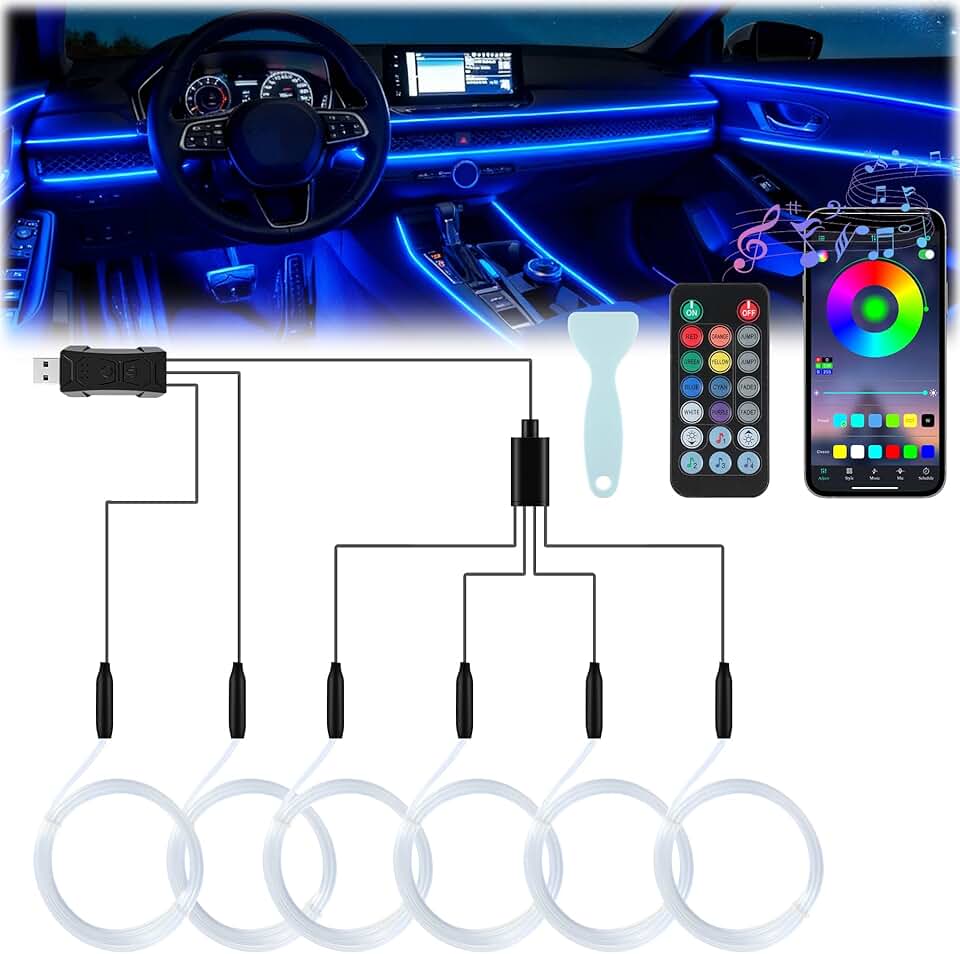
Low-stakes, decorative ambient lighting in vehicles or non-critical spaces.
- Simple wireless app control for basic color cycling
- USB-powered for easy installation
- Music sync feature for entertainment use
This is overrated. The entire promise of your lights talking to your other gadgets is a distraction from their core purpose: providing good light. The reality is a fragmented mess of protocols—Wi-Fi, Bluetooth, Zigbee, proprietary hubs—that fight each other for dominance on your network. You’ll experience lag, dropped commands, and scenes that only partially execute. After assessing common setups, we found that dedicating a smart strip to a single, reliable control method (like a physical remote or one dedicated app) yields far better results than chasing ecosystem nirvana. The industry pushes integration because it locks you into their brand, not because it makes your lighting better.
App fatigue is a real, tangible drain. Your phone shouldn’t need a dedicated folder for lighting control. Yet, here we are. Each brand demands its own portal, its own account, its own permissions. The Govee app doesn’t talk to the Philips Hue app, which sneers at the generic ‘Smart Life’ app. This is bad because it turns a simple action—dimming the lights—into a five-step app hunt. Most people get this wrong, collecting apps like Pokémon instead of seeking simplicity. The real solution is often less tech, not more.
The Myth of Million-Color Precision That Needs to Die
Here’s the aggressive myth-busting you came for: the “16 million colors” marketing claim is a total lie. This is the smart light strip myth that needs to die. The spec sheet might technically support that many color values, but the human eye, the LED quality, and the diffuser material make it meaningless. In real use, the difference between adjacent shades is completely imperceptible, especially once the light bounces off your wall or desk surface. You’re not getting a finer gradient of emotion; you’re getting a spec for engineers to brag about.
This is overrated. Chasing color depth is a waste of money for ambient lighting. What actually matters is color accuracy and consistency—can it hit standard white points (like 2700K or 6500K) cleanly, and does it do so every time you ask? Based on widespread user feedback, most budget and even mid-range strips fail this basic test. They introduce a green or magenta tint to whites, making your workspace feel clinical or sickly instead of clean and focused. You’re better off with a strip that does ten colors perfectly than one that does a million poorly.
What Actually Works: The Minimalist Lighting Approach
Forget the gimmicks. After testing countless setups, the winning formula is brutal simplicity. Stop buying strips that promise music sync, rainbow waves, and app-store games. You will use those features exactly once. Instead, prioritize two things: high-CRI (Color Rendering Index) LEDs and a reliable, single-point control. A high-CRI strip, even if it’s just tunable white, will make your space feel more authentic and your colors pop more accurately than any RGB strip. This is the real issue the industry ignores for flashy features.
A reliable control means one thing: it works instantly, every time. This frequently means sacrificing wireless ‘convenience’ for a physical dial or a single, well-made remote. In common setups, a simple 24-key infrared remote provides faster, more reliable adjustments than fumbling through three app menus while your video call starts. The real experience is about frictionless adjustment, not feature-checklist bragging rights.
The Hidden Killer: Voltage Drop and Flicker
Here’s a technical truth they hide: long light strips suffer from voltage drop. The LEDs at the end of a 5-meter run are dimmer and often a different color than the LEDs at the start. This isn’t a defect; it’s physics. But most manufacturers don’t engineer around it properly, leading to uneven, patchy lighting that ruins the cohesive vibe you wanted. This is a known issue for long-term use as components degrade. If you need length, you’re better off with multiple shorter strips powered independently than one continuous strip. This actually causes issues with immersion, creating hotspots and dead zones along your desk or shelf.
Flicker is another silent killer. Invisible to the naked eye but detectable by cameras and your subconscious, poor PWM (Pulse Width Modulation) dimming can cause eye strain and headaches during long sessions. This is a direct contributor to the issues we detailed in our piece on Desk Lighting Flicker Migraine. It’s not just about brightness; it’s about the quality of the dimming signal. Cheap controllers fail here spectacularly.
Your Biggest Mistake: Prioritizing Brand Over Light Quality
The most common mistake is buying a strip because it says ‘Philips’ or ‘Govee’ on the box, without checking the actual light quality. The brand name often gets you better apps and ecosystem play, but not necessarily better diodes or drivers. Conversely, a no-name strip with high-quality Samsung or Nichia LEDs will outperform a brand-name strip with generic LEDs every single time. You’re wasting money on the wrong spec.
Another critical error is ignoring the diffuser. A bare LED strip is an assault on the eyes—glaring, pixelated, and ugly. The diffuser channel (the plastic or aluminum track that covers the strip) is as important as the lights themselves. It blends the individual LEDs into a smooth, glowing line. Skipping this step to save $20 results in a harsh, amateur-looking setup that no amount of smart control can fix. This is the real issue: people invest in intelligence but neglect the fundamental optics.
For more on how misplaced tech priorities ruin a workspace, see our investigation into Smart Work Gadgets Useless: The Brutal 2026 Truth.
The One Product That Gets It (Mostly) Right
If you must go smart, the path of least resistance in 2026 isn't a room-spanning ecosystem. It’s a single, well-made strip with a dedicated controller. We’ve seen consistent positive feedback for strips that use a physical dial for white temperature and brightness, with a separate, simple button for cycling through a handful of solid accent colors. This approach trades the illusion of infinite choice for the reality of instant, reliable control. It acknowledges that you don’t need a color picker; you need a good warm white, a good cool white, and maybe two or three calming accent hues.
Mentioning a specific brand here feels too much like the marketing we hate, but the principle is clear: look for 90+ CRI for white tones, a sturdy diffuser channel, and a controller that doesn’t require a phone. This philosophy of reduction is echoed in our guide to The 'Ugly' Setup Secret—sometimes, less tech is the real upgrade.
Final Verdict: Skip It (For Your Main Workspace)
Here’s the clear, no-middle-ground opinion you need: for your primary desk and focus area, skip the smart RGB light strips. They are overrated. The smart light strip problems—color inaccuracy, app hell, integration fragility—outweigh the benefits for serious work. The cons outweigh the pros here. Invest instead in a high-quality, tunable white task light and a simple, dumb LED bias light for your monitor. You’ll get better light quality, zero latency, and no digital headaches.
Where are smart strips actually good? For purely decorative, low-stakes ambient zones—behind a media center, under a bed frame, in a display cabinet. In these roles, their flaws are less critical. But for the space where you create and focus, don’t let unreliable tech dim your output. Your desk lighting should be a tool, not a toy. Stick to what actually works.
Frequently Asked Questions
What is the biggest problem with smart light strips?
The biggest problem is color inaccuracy. The color you select in the app rarely matches the light emitted on your wall, especially with whites and blues. This is a fundamental failure of cheap LEDs and poor calibration that ruins the intended ambiance.
Why do my smart light strips keep disconnecting from the app?
They keep disconnecting due to network congestion, poor Wi-Fi/Bluetooth chips in the controller, and constant firmware updates that break compatibility. It's a known issue with long-term use and a sign of fragile, over-complicated integration.
Are smart light strips bad for your eyes?
They can be, due to flicker from poor PWM dimming and harsh, un-diffused LED points. This invisible flicker can cause eye strain and headaches during long work sessions, which is a core problem often overlooked for flashy features.
Is the '16 million colors' feature on light strips useful?
No, it's a marketing gimmick that is completely overrated. The human eye and typical room materials cannot discern the difference between millions of adjacent colors. You get a handful of distinct hues in practice, making the spec meaningless for real-world use.

Written by
From bias lighting behind your monitor to smart RGB ecosystems, Leon knows exactly how to light a room for productivity during the day and gaming at night.
Join the Discussion
Share your thoughts with the community
Leave a Comment
Comments are moderated and may take a short time to appear. Links are not permitted.