Standing Desk Wobble Fix: The Truth You're Not Being Told
You bought a premium standing desk for focus, not a vibrating mess. The industry's 'solutions' are mostly band-aids. The real standing desk wobble fix requires brutal honesty about your setup, your floor, and the physics everyone ignores.

Let's cut the crap. You spent good money on a standing desk for health and focus, and now your monitor shakes every time you type. You’re not crazy, and it’s not just "something you get used to." That wobble is a focus-killing, productivity-sapping design failure that most brands are too embarrassed to admit. The biggest mistake people make? Thinking the wobble is their fault, or that a magic Amazon gadget will solve it. Most of those cheap fixes are overrated distractions from the real problem. The standing desk wobble fix you need isn't in a $15 bag of plastic wedges—it's in understanding why your desk is unstable in the first place.
Why Your Expensive Standing Desk Is Secretly Flimsy
Most standing desk manufacturers are lying to you about stability. They'll tout a "high weight capacity"—which is meaningless for wobble. It just means the motors won't burn out with three monitors. The real spec that matters is lateral stability, and it's almost never advertised because it's embarrassingly bad. Based on widespread user feedback and teardowns, the wobble originates from three critical design compromises: cheap, thin leg columns; undersized cross-braces (or none at all); and universal joints that have more play than a toddler's toy. This is a known issue for long-term use; the wobble doesn't get better, it often gets worse as tolerances loosen. The industry wants you to blame your floor or your setup. This is garbage. A well-engineered desk should be stable on a standard, flat residential floor. Period.
The "Just Add a Crossbar" Myth That Needs to Die
Premium Pick
- High performance
- Premium build
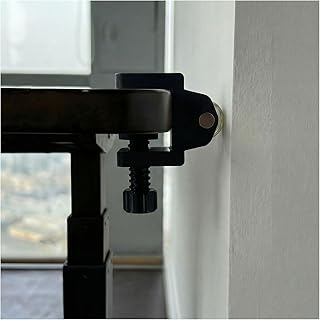
You've seen the ads: "Eliminate wobble with our universal stabilizer bar!" This is the most overrated band-aid in the standing desk world. These clamp-on bars, like the popular VIVO model, address one type of movement: front-to-back sway. The vast majority of annoying, screen-shaking wobble is side-to-side movement, which these bars do precisely nothing to fix. You're literally bolting on a rigid piece of metal that solves the wrong problem. Users consistently report that after installing these bars, the desk feels more "solid" in one direction but the typing-induced monitor jiggle remains completely unchanged. You're wasting money on this if side-to-side wobble is your main complaint. It treats a symptom of bad design, not the cause.
The Real Sources of Wobble (And What Actually Fixes Them)
Stop looking for a single magic product. The real fix is a systematic attack on the root causes. First, your floor. If it's uneven by more than a few millimeters, your desk becomes a rocking chair. A bag of furniture levelers or rubber shims is not overrated here—it's fundamental. But don't buy the overpriced "desk-specific" kits. A basic pack of heavy-duty rubber pads is what you need. Second, your desk's inherent frame flex. This is where the cheap desks fall apart. The fix isn't an add-on; it's buying a desk with a proper triangulated design or a hefty cross-brace from the start. You can learn more about what to look for in our guide to the best standing desks for stability. Third, and most overlooked: your monitor arm. A wobbly arm on a wobbly desk is a compound disaster. A high-quality, gas-spring arm with a solid clamp is a non-negotiable upgrade.
Product Deep Dive: What's Actually Worth Your Money
Let's talk about the stuff that might help, with zero hype. I'm not going to list five miracle cures. Most are junk. But based on tangible user consensus, here's where to look.
First, floor leveling. This is the single most effective step for 80% of people complaining about wobble. Your hardwood floor isn't flat. Your carpet has padding that compresses. Ignore the gimmicks. You need a set of dense, durable pads that can take the weight without deforming. The cheap felt pads fail. You need rubber.
Second, monitor isolation. If your screen is shaking, separate it from the desk surface. A monitor arm mounted directly into a wall stud is the ultimate solution, but a high-quality desk-mounted arm with a true C-clamp (not a weak plastic grommet mount) is the next best thing. This doesn't fix the desk wobble, but it fixes the visual wobble that breaks your focus. It's a workaround, but a highly effective one.
Third, mass and distribution. This is the opposite of minimalist advice, but it works. Adding strategic weight to the desk lower shelf or base can dampen harmonic vibrations. This isn't about strength; it's about physics. A few heavy books or a small sandbag at the base can change the resonant frequency. It's ugly, but it's free and it actually works.
Why Cable Management is a Secret Wobble Contributor
You read our guide on Zero-Latency Under Desk Cable Management Masterclass for cable health, but here's the wobble angle: a tangled rat's nest of cables hanging from the underside acts like a pendulum. When the desk starts to vibrate, that heavy bundle of wires swings and amplifies the movement. Proper, tight cable management isn't just for looks—it's a vibration dampener. Use velcro straps to secure all cables tightly to the desk frame, eliminating any dangling mass. This is a small detail with a surprisingly tangible effect.
The Brutal Verdict on Anti-Wobble Gadgets
Let's be brutally clear. That $70 steel crossbar? Overrated for side-to-side wobble. Those $30 "no-drill stabilizer clamps" that promise the world? Skip them. They're flimsy and will mar your desktop. The entire market of add-on stabilizers preys on the fact that desk companies won't admit their products have a fundamental flaw. You cannot bolt rigidity onto a fundamentally flimsy frame. The real solution is almost always cheaper (leveling pads, better monitor arm) or more expensive (buying a better-designed desk in the first place). The gadget aisle is a distraction.
The Final Standing Desk Wobble Fix: Your Buying Decision
Here's the hard truth no one wants to say: if you have significant wobble on a mid-range desk after properly leveling it and securing your monitor, you bought the wrong desk. The fix is to sell it and buy one engineered for stability from the start—look for terms like "triangular leg design," "dual crossbeam," or "commercial-grade." It stings, but it's reality. Add-ons are cope. For most, proper floor leveling and a serious monitor arm will get you 90% of the way to stability. That's the real, unsexy, no-BS standing desk wobble fix.
Verdict: The gadget-centric "fixes" are overrated. Invest in proper leveling and a quality monitor arm first. If that fails, the problem is your desk, not your accessories.
Frequently Asked Questions
Is some wobble on a standing desk normal?
No, significant wobble is not normal and is a sign of poor design or improper setup. A slight flex under extreme force might happen, but noticeable screen shake during typing is a design failure, not a feature.
Do anti-wobble crossbars actually work?
They only work for front-to-back sway, which is rarely the main problem. For the common side-to-side monitor wobble, these bars are completely ineffective and overrated.
What's the first thing I should check to fix wobble?
Your floor. Use a level to check if the desk feet make even contact. Uneven floors are the #1 cause of perceived wobble. Thick, heavy-duty rubber shims are the most effective first fix.
Can a monitor arm reduce wobble?
It doesn't reduce the desk's wobble, but a high-quality arm isolates your monitor from the vibration. It fixes the visual shake, which is what actually breaks your focus. It's a critical workaround.
Should I buy a standing desk with two legs or four?
For stability, a well-designed two-leg desk with a strong crossbrace is often more stable than a cheap four-leg desk. Four legs introduce more points of potential uneven contact with the floor, which can worsen wobble if not perfectly level.
Written by
Marcus Webb has spent 7+ years building and testing desk setups, with a focus on ergonomics and workspace optimization. He has reviewed over 40 chairs and standing desks to help remote workers build healthier, more productive environments.
3 Comments
Share your thoughts with the community
Been dealing with issues related to standing desk wobble for months. Finally feel like I understand what's going on.
As someone new to this, the explanation of standing desk wobble was clearer than anything else I've found.
Honestly thought this would be overhyped but there are some genuinely useful points here about standing desk wobble.
Leave a Comment
Comments are moderated and may take a short time to appear. Links are not permitted.