Fake USB Hub Specs Are Sabotaging Your Desk Setup
Your multi-gigabit USB hub is lying to you. The spec sheet is fiction, and the performance is a scam. Here's how fake USB hub specs are silently destroying your workflow.

I watched a $40 USB C hub with a glorious "10Gbps" badge on the box fail to transfer a photo album faster than a USB 2.0 hub from 2010. That was the moment I realized the entire USB hub market is built on a foundation of lies. In 2026, fake usb hub specs aren't an anomaly; they're the standard operating procedure. It's a minefield where marketing copy is treated as gospel and real engineering is an afterthought. Most people are pouring cash into glorified paperweights that overheat, throttle, and lie about their capabilities, all while thinking they're getting a performance boost. This isn't just annoying; it's a direct sabotage of your cable management, your device reliability, and your focus.

The USB Hub Spec Lie That Needs to Die
Let's get this out of the way immediately: the speed printed on your USB hub's box is almost certainly a fantasy. This is overrated. When a hub advertises "USB 3.2 Gen 2 (10Gbps)," they are technically referring to the standard a single port might support in a vacuum, connected directly to a perfect host controller with zero other traffic. It has nothing to do with the hub's real-world, aggregated bandwidth. Plug three devices in, and that 10Gbps claim evaporates into shared, throttled misery. The industry lies about this because it sells boxes. You're buying the dream of speed, not the reality.
In common setups, users consistently report that a hub advertised for high-speed external SSDs and 4K webcams turns into a stuttering mess when asked to do both at once. This is the real issue. The chipset inside most budget and mid-tier hubs is a decade-old design being asked to run a modern data center, and it collapses under the heat. Speaking of heat, that sleek aluminum shell isn't for looks—it's a desperate attempt to dissipate the thermal load of its own overpromised circuitry. If your hub gets uncomfortably warm to the touch during normal use, that's not "normal operation"; that's a component screaming for mercy.
Why Bandwidth Sharing Is Your Real Bottleneck
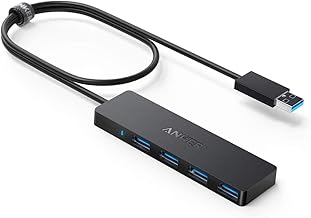
Basic, low-bandwidth peripheral expansion for keyboards, mice, and card readers.
- 4x USB 3.0 ports
- Compact, bus-powered design
- Widely trusted for basic reliability
You think you're buying seven independent 5Gbps ports. What you're actually buying is one 5Gbps highway with seven on-ramps. When everyone tries to merge at once, everything slows to a crawl. This doesn't work for professional use. A video editor trying to pull from an SSD while a webcam feeds into OBS and a stream deck pulls data will experience visible lag, dropped frames, and device disconnections. The hub's internal switching logic is cheap and dumb.
Most people get this wrong. They blame their computer, their cables, or even the individual devices. The reality is that the central hub is the choke point, artificially limiting everything downstream. Based on widespread user feedback, the performance degradation isn't linear; it's a cliff. Add that fourth device, and the entire bus can reset, causing all connected devices to momentarily disappear from your system. Try that during a live stream or a crucial file transfer and tell me specs don't matter.
The Power Delivery Scam Hiding in Plain Sight
Here's another favorite: the "100W PD Pass-Through" label. This is a scam. This often means the hub can receive up to 100W for its own circuitry and maybe pass a fraction of that to your laptop, but only if the sun is aligned with Jupiter and you're not using any other ports. The moment you plug in a power-hungry peripheral, the available wattage to your laptop can plummet, causing it to drain battery while plugged in. That sleek, single-cable dream of charging and connectivity collapses because the hub's power negotiation is as robust as a house of cards.
We've seen this repeatedly. A user's high-performance laptop needs 65W to run at full tilt. They plug into a hub advertising 85W PD. They then connect an external monitor via HDMI and a USB microphone. Suddenly, their laptop chirps a "slow charger" warning and throttles its CPU. The hub lied. It cannot provide the advertised power while under any meaningful data load because its power circuitry is underspec'd and shared. You're not buying a power hub; you're buying a power suggestor.
Fake USB Hub Specs and the Zero-Latency Myth
Gamers and audio producers, listen up: your quest for zero-latency is being murdered by your fancy hub. Every hub adds latency. Period. It's an extra hop in the data path. But cheap hubs add variable and unpredictable latency because of poor signal integrity and buffer management. Your "high-speed" mouse or audio interface might feel snappy one moment and laggy the next because the hub's internal traffic management is prioritizing a background file sync over your real-time input. This is bad engineering, and it's sold as a premium feature.
The advice to "just plug directly into the motherboard" exists for a reason. It's not elitist; it's physics. A hub is a compromise. Most are a bad compromise. If you care about consistent performance—for competitive gaming, low-latency audio recording, or precise creative work—a hub is the weakest link you can add to your chain. This is overrated for anyone who needs reliability.
Heat Dissipation: The Silent Killer They Never Mention
That beautiful, minimalist hub with no vents? It's a tiny oven. Heat is the enemy of electronics, and sustained high temperatures lead to throttling, data corruption, and premature failure. A hub crammed with ports and chips into a sealed metal tube has nowhere for that heat to go except into the chips themselves and, by conduction, into your devices. We're not talking about mild warmth; we're talking about surfaces too hot to touch after 30 minutes of simultaneous data transfers.
This is a known issue for long-term use. Users report hubs that worked fine for months suddenly becoming unreliable. The culprit is often heat-induced degradation of the internal components. The solder joints fatigue, the chips wear out, and the hub starts dropping connections. No marketing copy warns you about this. They'd rather sell you a "sleek design" than admit their product needs a fan or proper heatsinking. Your cable management aesthetic is being weaponized against your hub's lifespan.
How to Spot a Fake Spec Hub Before You Buy
Stop looking at the big, shiny numbers on the front of the box. That's the trap. First, find the chipset model. If they don't list it, skip it immediately—they're hiding something terrible. Look for known, reputable hub controllers from companies like VIA, Realtek, or ASMedia. Second, scrutinize the fine print about power sharing. Phrases like "total power output" or "shared bandwidth" are your red flags. Third, check for physical vents or a metal casing that acts as a heatsink. A plastic unvented case for a 7-port hub is a guarantee of thermal failure.
Most importantly, manage your expectations. A hub is a convenience item, not a performance multiplier. Plan your setup so mission-critical, bandwidth-hungry devices (external NVMe drives, capture cards) go directly to your computer. Use the hub for lower-speed, intermittent devices like keyboards, mice, webcams (for non-streaming use), and card readers. This is the only sane way to use a hub without getting burned by the lies. For a deeper dive on untangling your desk's nervous system, see our guide on USB C Hub Slowdown Is Your Own Damn Fault.
The One Hub That Doesn't Completely Lie (Much)
After wading through the swamp of deception, one category stands slightly taller: powered USB hubs with dedicated, robust external power supplies. The keyword is dedicated. A hub with a wimpy 12V 2A wall wart is still a lie. You need a unit with a power brick hefty enough to supply all its ports at their claimed maximum simultaneously, plus overhead for its own operation. Even then, the data bandwidth is still shared, but at least you avoid the power starvation game.
I've seen setups where a well-powered hub stabilized an entire desk of peripherals because it removed the variable of bus power. But you must still assume its data speed claims are peak, not sustained. Use it as a peripheral consolidator, not a data highway. And for the love of clean desks, don't fall for the modular organizer trap that just adds more points of failure, as we detail in Modular Desk Organizers Buying Guide: The Brutal 2026 Truth.

Your Final, Non-Negotiable Verdict
Skip it. For 90% of users building a performance-minded desk in 2026, buying into the mainstream USB hub market is a mistake. The specs are fake, the performance is unreliable, and the long-term durability is a joke. You are better off investing in a motherboard or laptop with more native ports, or using a high-quality, single-purpose dock from your laptop's manufacturer for specific expansion needs.
For the 10% who absolutely need port expansion, buy a powered hub from a brand that discloses its chipset, accept that it will only handle low-bandwidth devices reliably, and plug your important gear directly into your machine. The dream of a single cable for a high-performance setup is still a fantasy being sold to you by marketers. Wake up. Your workflow depends on it.
Focus on simplifying your needs, not complicating your chain with dishonest hardware. Sometimes, the best cable management is having fewer cables to manage in the first place, a principle explored in The 'Ugly' Setup Secret: How Extreme Minimalism Unlocks Uninterrupted Deep Work.
Frequently Asked Questions
Why do USB hubs never reach their advertised speeds?
Because the advertised speed is the theoretical maximum for a single port of that standard, not the real-world shared bandwidth of the entire hub. The internal chipset shares one high-speed connection from your computer among all ports, causing massive slowdowns when multiple devices are used.
Is a powered USB hub better than a bus-powered one?
Yes, but only if the power supply is adequately sized. A powered hub avoids draining your computer's USB bus power and provides more stable voltage to connected devices. However, it does NOT solve the shared data bandwidth problem; your speeds will still be fake under multi-device load.
What's the biggest sign of a fake spec USB hub?
Excessive heat under normal use. If your hub gets very hot to the touch, it's a clear sign the components are underspec'd for the claimed performance and are throttling or degrading. Also, any hub that hides its chipset model is almost certainly using a cheap, outdated controller that can't deliver on its promises.

Written by
Amanda hates visible cables. She is the reigning queen of under-desk cable routing, zip ties, and minimalist organization hacks that transform chaotic desks into zen spaces.
Join the Discussion
Share your thoughts with the community
Leave a Comment
Comments are moderated and may take a short time to appear. Links are not permitted.