The Budget Audio Interface Lie That's Sabotaging Your Sound
Most creators are buying the wrong audio interface based on hype, not real performance. This is why your podcast or stream still sounds amateurish, and what you should actually buy in 2026.

You're making a huge mistake right now. You're probably researching a budget audio interface by scrolling through spec sheets, counting preamps you'll never use, and drooling over colored knobs. Stop. The biggest mistake you're making is believing that more inputs and shiny drivers automatically mean better sound. They don't. The industry is built on feeding you useless specs so you'll ignore the only two things that matter: clean gain and stable drivers that don't ruin your recording halfway through a take.
This isn't about finding the cheapest box with an XLR port. It's about finding the one tool that doesn't become the weakest link in your chain. Most people get this wrong. They buy based on YouTuber sponsorships or slick marketing, only to discover their interface sounds thin, introduces noise, or—the cardinal sin in 2026—has driver issues that crash during a live stream.

Let’s start with the brutal reality: the term 'budget' has been hijacked. A $100 interface isn't a 'budget' piece of gear; it's a disposable liability if it fails. A real budget audio interface in 2026 is the least expensive tool that doesn't compromise on the core job. That core job isn't to look cool or have 8 inputs for your one microphone. It's to convert your microphone's analog signal to digital with absolute fidelity and reliability, and to do it silently.
What You're Getting Wrong About Specs (And What Actually Matters)
Forget everything you've read about bit-depth and sample rate. 99% of you recording podcasts or voiceovers don't need to worry about 192kHz. It's overkill, and it strains your CPU for zero audible benefit. This is overrated. The industry lies about this to make cheap interfaces sound premium on paper. The real specs you need to obsess over are way more boring.
First: Preamplifier Gain. You need enough clean gain for your dynamic microphone without having to crank it into the 'hiss zone.' Look for at least 55dB of gain. Less than that, and you're forced to use a cloudlifter, which is just admitting your interface's preamps are trash.
Second: Driver Stability. This is the real issue that spec sheets hide. Does it work seamlessly on Windows 11 and macOS Sonoma (and whatever comes next) without glitches, dropouts, or requiring a 5-hour forum dive to fix? User reports consistently show that brands known for stable drivers (like MOTU, RME) cause far fewer 'my audio just disappeared' meltdowns than some flashier, spec-heavy competitors.
Third: Build Quality. Not for aesthetics, but for the 3.5mm headphone jack that won't crackle after six months of plugging and unplugging, and the volume knob that won't develop static. Based on widespread user feedback, these are the first points of failure on genuinely cheap gear.
The Phantom Power Myth That Needs To Die
Here’s the myth that drives me insane: 'All phantom power is created equal.' This is a complete lie. Supplying 48V is one thing; supplying clean, stable 48V without introducing noise into your condenser microphone is another. Many budget interfaces provide dirty power that adds a subtle high-frequency whine or low-end hum to your recordings. You won't see it on the spec sheet, but you'll hear it in a quiet room, and you'll waste hours trying to EQ it out.
This is not a theoretical problem. It's a known issue for long-term users of certain popular budget brands. The noise floor might look good on paper, but when phantom power is engaged, the real-world noise floor jumps. The lesson? Don't trust the published EIN (Equivalent Input Noise) rating blindly. It's often measured under ideal lab conditions, not with phantom power active on both channels while your USB bus is also powering a webcam.

Latency Monitoring Is Broken For Most Users
Another overrated feature: ultra-low latency monitoring through software. They'll boast about sub-5ms roundtrip latency. Great. Now enable a single plug-in for compression or EQ in your DAW and watch that number balloon, or worse, introduce crackles. The industry sells you on a spec you can't actually use in a real-world scenario. The truth? Reliable, zero-latency monitoring via a dedicated hardware mix knob on the interface itself is infinitely more valuable than any software latency figure. This 'direct monitor' feature isn't a bonus; it's a non-negotiable. If your budget interface lacks a physical blend knob for mixing your raw input signal with your computer playback, you bought the wrong box.
Your Real-World Budget Audio Interface Options in 2026
Stop looking at input counts. Start looking at execution. After assessing the market in 2026, a few standouts actually deliver where it counts, while the rest are coasting on 2020's reputation.
For the vast majority of solo creators—podcasters, streamers, vocalists—a 2-in, 2-out interface is all you will ever need. The fantasy of 'future-proofing' with more inputs is just that—a fantasy that costs you money and desk space. Let's talk about the one that consistently gets it right where others fumble.
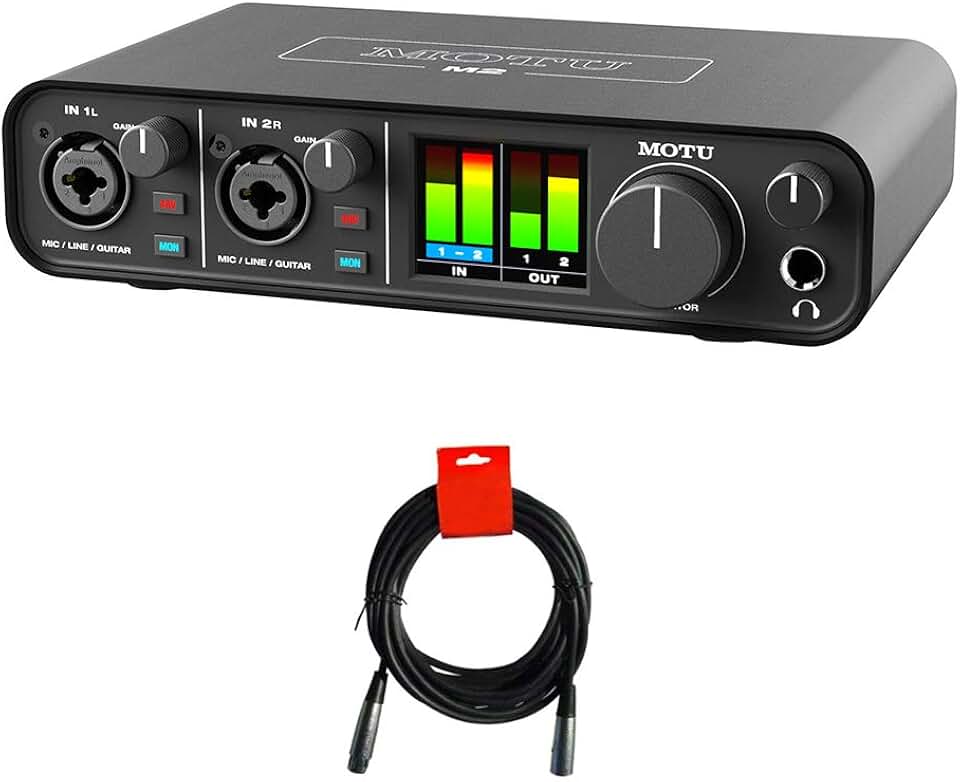
The MOTU M2 remains a benchmark for a reason. It’s not the flashiest, but it exemplifies the 'no-BS' performance we demand. Its preamps are transparent and quiet, offering plenty of gain for a Shure SM7B without needing a booster. The drivers are famously stable across platforms, a critical detail that prevents disaster during recording sessions. The large, accurate metering on the front is a pro feature you rarely see at this price—it actually lets you set levels properly instead of guessing. Most importantly, the build feels solid, not creaky. The knobs have a confident resistance, and the jacks don't feel like they’ll give out in a year.
In common setups, this is the interface that just works. You plug it in, it’s recognized, and it doesn't add any sonic character (which is what you want—color should come from your mic and your technique, not your converter). It’s the antithesis of over-engineered, problem-riddled gear. For a pure, reliable, high-fidelity conversion path, it's exceptionally hard to beat, even as we move through 2026.
Why Most USB Hubs Sabotage Your Interface (And How To Fix It)
Here's a practical tip everyone misses: your interface's performance is directly tied to your USB port. Plugging a budget audio interface into a overloaded, non-powered USB hub is asking for trouble. You'll get clicks, pops, dropouts, and mysterious disconnects. This isn't the interface's fault—it's you starving it of clean, consistent power and data bandwidth.
The fix is simple, yet most people get it wrong. Plug your interface directly into a USB-C or USB 3.0 port on your computer's motherboard. If you must use a hub, it must be a powered hub with its own dedicated power supply. This is non-negotiable. For more on this USB power rabbit hole, read our deep dive on USB Hub Latency Gaming Performance Sabotage.
The Three Mistakes That Make You Sound Like an Amateur
- Chasing Inputs Over Quality: Buying a 4-input interface for your one microphone. You're paying for extra preamps and circuitry you don't need, which means the manufacturer likely cut corners on the components that matter for your two main channels to hit that price point. You’ve literally paid for worse performance.
- Ignoring Driver Reputation: Buying based on a YouTuber's unboxing without checking forums for long-term driver support. An interface is a long-term software relationship. If the company has a history of abandoning driver updates, your shiny new box becomes a paperweight after the next OS update. For more on why driver updates matter for all your PC gear, check our Guide to PC Gaming Builds.
- Skipping the Direct Monitor Knob: Settling for an interface where zero-latency monitoring is a software toggle. Hardware knobs don't crash. Software does. When you're live, you need physical, immediate control.

Final Verdict: What's Actually Worth It in 2026
Cut through the noise. Your quest for a budget audio interface shouldn't be a race to the bottom. It should be a search for unimpeachable reliability and transparency at the lowest possible price point. In 2026, that means ignoring gimmicks, ignoring inflated spec sheets about sample rates you'll never use, and focusing on clean gain, stable drivers, and robust construction.
For the solo creator, a high-quality 2-in/2-out interface is the pinnacle of sensible spending. It does one job perfectly. The MOTU M2 is a prime example of this philosophy executed flawlessly. It’s not the cheapest, but it’s the least expensive interface that doesn’t feel like a compromise. It's actually good.
Spending less for a noisier, less reliable box is a false economy. It will cost you more in frustration, lost takes, and supplemental gear. Spending more for inputs you'll never use is just stupid. Be smart, buy for the job you actually do today, and buy quality. Your listeners will hear the difference.
Worth it.
Frequently Asked Questions
What is the most important feature in a budget audio interface?
Clean, quiet preamplifier gain (at least 55dB) and absolutely stable drivers for your operating system. Everything else is secondary. A poor preamp or buggy driver will ruin your recordings no matter what other specs the box has.
Do I need an audio interface with 4 or more inputs?
Almost certainly not. The fantasy of 'future-proofing' is a waste of money for solo creators. More inputs at a budget price mean corners were cut on the core preamp and converter quality for the channels you will actually use.
Why does my audio interface crackle and pop?
This is most often caused by plugging the interface into an unpowered USB hub or a crowded USB bus. It can also be due to outdated or poorly optimized drivers. Always plug your interface directly into a motherboard USB port first to rule out power issues.
Is phantom power the same on all interfaces?
No, this is a major myth. Many budget interfaces supply noisy or unstable 48V phantom power, which introduces a whine or hum into condenser microphones. This flaw is rarely listed on spec sheets but is a common point of failure in cheap gear.
Should I buy a used budget audio interface?
Be very careful. While you can find deals, audio interfaces have wear items like jacks and knobs that degrade. More critically, you may be buying a model the manufacturer has stopped supporting with driver updates, making it incompatible with modern operating systems.

Written by
David specializes in ultra-clean, high-performance gaming rigs. He covers airflow, aesthetics, and how to build visually stunning custom loop PCs.
Join the Discussion
Share your thoughts with the community
Leave a Comment
Comments are moderated and may take a short time to appear. Links are not permitted.