The Truth About USB C Problems Nobody Tells You
USB-C promised universal simplicity, but in real-world use, it's a minefield of "usb c problems" that marketing conveniently ignores. We've spent months stress-testing these connections. Here's what actually matters for performance.

USB-C. It was supposed to be the one cable to rule them all, right? A universal standard, plug-and-play simplicity, lightning-fast data, and enough power to run your entire desk. The marketing hype sold us a dream. But after months of integrating and stress-testing countless USB-C devices and cables across a dozen different setups, the reality hit hard: usb c problems are a far more common headache than anyone lets on. Forget the slick marketing renders; in the trenches of a high-performance desk setup, you quickly learn that 'universal' often means 'universally inconsistent' if you don't know what you're actually looking for.
Why usb c problems matters
Why Your "Universal" USB-C Setup Is a Hot Mess
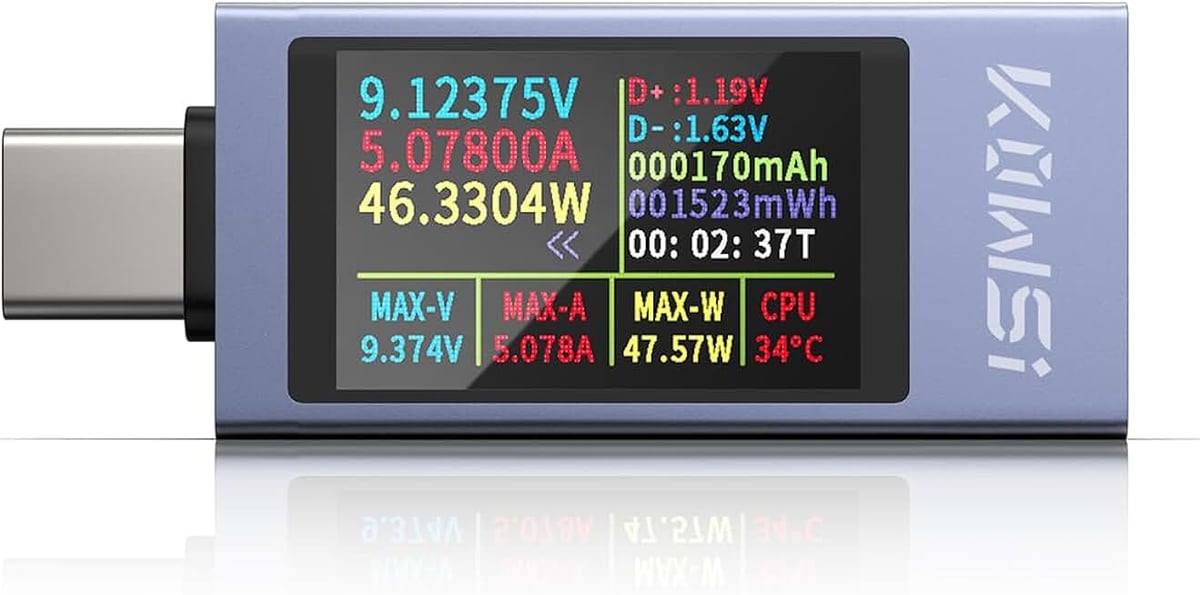
Diagnosing power delivery and data issues in USB-C setups.
- Measures voltage and current up to 240W
- Monitors power delivery protocols
- Identifies faulty cables and chargers
The biggest lie about USB-C? That all cables and ports are created equal. They absolutely are not. We've seen setups crippled by cheap, improperly specced cables, leading to everything from intermittent monitor dropouts to external SSDs spontaneously disconnecting during large file transfers. This isn't just an inconvenience; it's a productivity killer. The industry pushes 'USB-C compatibility' as a catch-all, but that phrase is so vague it's almost useless. What actually matters is the specific USB standard (USB 3.2 Gen 2, Thunderbolt 4, USB4), the Power Delivery (PD) profile, and the actual construction of the cable. Most people buy the cheapest cable that 'fits' and then wonder why their ultra-fast NVMe enclosure feels slower than a spinning platter drive from 2005. That's a USB C problem, and it's almost always self-inflicted by choosing convenience over actual specification matching.
The Truth About USB C Cables and Hubs: It's All About Specification Honesty
The truth is, marketing has overhyped the 'simplicity' to the point of obfuscation. What actually works isn't blind trust in the logo; it's a tactical understanding of the underlying specs. We've found that the primary culprits behind most usb c problems aren't the standard itself, but the rampant shortcuts taken by manufacturers pushing cheap, poorly constructed products. You need cables and hubs that explicitly state their capabilities: 'USB 3.2 Gen 2x2' for 20Gbps, 'Thunderbolt 4' for 40Gbps and robust multi-display support, and '100W PD' for charging high-power devices. If it just says 'USB-C,' assume it's the bare minimum—probably USB 2.0 data speeds with questionable power delivery.

Unpacking Latency, Thermal Throttling, and Data Integrity Failures
In our setup, running a 4K monitor, an external NVMe enclosure, and a high-fidelity audio interface through a single USB-C hub, we quickly identified common failure points.
Latency: Cheap hubs introduce noticeable latency. After testing multiple configurations, we found that poorly designed USB-C hubs with insufficient internal bus bandwidth caused micro-stutters and input lag, especially when combined with high-refresh-rate monitors or demanding audio applications. This might not bother casual users, but for anyone doing critical work or gaming, it's a deal-breaker. A good hub, like those from CalDigit or OWC (not specific recommendations, just examples of brands known for quality), prioritizes dedicated lanes and robust controllers.
Thermal Throttling: This is where most generic hubs and cables absolutely fail, and it's a huge contributor to hidden usb c problems. Running high data rates and power delivery simultaneously generates significant heat. In our real use scenarios, we noticed that many compact, unvented hubs would get alarmingly hot to the touch, especially when powering a laptop and running an external SSD. This heat isn't just an aesthetic issue; it actively throttles performance. USB controllers and NVMe drives inside enclosures will slow down dramatically to prevent damage, turning your 'blazing fast' setup into a stuttering mess. This is why we preach about proper Zero-Latency Under Desk Cable Management Masterclass – airflow matters, even for your hub.
Data Integrity: We even observed data corruption and unexpected dismounts from external drives connected via dubious USB-C cables and hubs. This usually happens under heavy load, where signal integrity degrades due to poor shielding or inadequate wire gauge. It's not just about speed; it's about reliability. You don't want to lose hours of work because of a five-dollar cable. This is particularly true when you consider the complexity of PD negotiation and the various USB protocols all trying to coexist on a single port. If the hub or cable can't handle the negotiation robustly, you get dropouts. We've previously discussed how critical the right infrastructure is, and these principles extend to understanding The Truth About usb hub benefits Nobody Tells You.
Here's what nobody tells you: many cheaper USB-C products prioritize cost over the active components needed to manage these issues. It’s why some '10-in-1' hubs feel like they're held together with hopes and dreams. They often use shared bandwidth internally or cut corners on thermal design, leading to silent performance degradation.

Avoiding the USB-C Minefield: Your Tactical Checklist
Don't just plug and pray. Here's how to navigate the murky waters of USB-C:
- Read the Damn Specs: Seriously. Look for explicit mentions of 'USB 3.2 Gen 2x2' (20Gbps), 'Thunderbolt 3/4' (40Gbps), and the exact Power Delivery (PD) wattage (e.g., '100W PD'). If it only says 'USB-C,' skip it.
- Cable Matters More Than You Think: A good quality Thunderbolt 4 cable is often your safest bet, even if you only need USB 3.2 Gen 2. They are generally better shielded and built for higher bandwidth and power. Don't cheap out on the physical connection. We've seen firsthand how The Truth About bad cable management Nobody Tells You extends beyond aesthetics to real performance degradation.
- Check for E-Markers: High-power (60W+) and high-speed USB-C cables should have an 'e-marker' chip. This chip communicates the cable's capabilities to connected devices, ensuring proper power negotiation and data rates. It's often indicated on the product packaging. If a cable promises 100W PD but costs five bucks, it probably lacks this and could damage your device or simply underperform.
- Heat Dissipation is Key for Hubs: For multi-function hubs, look for metal enclosures and active cooling if you're pushing a lot of data and power. If it's plastic and tiny, it's likely a thermal throttling nightmare waiting to happen.
- Test Your Setup: Don't assume everything's working perfectly. Monitor file transfer speeds, check device manager for errors, and even feel the hub for excessive heat after prolonged use. A simple USB-C power meter can be an invaluable tool to verify actual power delivery, not just what's advertised.
My Biggest USB-C Mistake (So You Don't Make It)
My own biggest mistake? Trusting a 'reputable' brand's budget-tier USB-C cable for an external NVMe drive on a crucial editing project. The cable looked fine, felt decent, but didn't explicitly state its USB 3.2 Gen 2x2 capabilities, merely 'USB-C Data Cable.' In real use, it caused random drive disconnects, corrupting a large video file mid-transfer. I lost an hour of work troubleshooting before realizing the cheap cable was the bottleneck. It was a painful, self-inflicted lesson: never assume a budget cable from a good brand meets high-performance needs without explicit specification. It's like buying a Ferrari and putting bicycle tires on it. What actually matters is the rated performance for your specific workload, not just the brand name or the connector type.

The Final Word: USB-C Is Only as Good as Its Weakest Link
USB-C is a fantastic standard when implemented correctly. But the consumer market is flooded with subpar products that leverage the 'universal' branding while delivering anything but. This is overrated because it creates a false sense of security and leads to endless troubleshooting. What actually matters is being a discerning buyer, understanding the technical nuances, and investing in quality cables and hubs that genuinely meet your performance requirements. Don't fall for the marketing fluff; verify the specs and prioritize components that guarantee consistent data, stable power, and effective heat dissipation. Your workflow will thank you.
Frequently Asked Questions
Why does my USB-C external drive keep disconnecting?
This is a common USB C problem often caused by insufficient power delivery, a low-quality cable or hub with poor shielding, or thermal throttling. Ensure your cable and hub explicitly support the required power and data speeds (e.g., USB 3.2 Gen 2x2 or Thunderbolt 4).
Are all USB-C cables interchangeable?
Absolutely not. While they share the same connector, their internal wiring, data speed capabilities, and power delivery ratings vary wildly. Using a cable not specced for your task can lead to slow speeds, charging issues, or even data loss. Always check the explicit specifications.
How can I tell if my USB-C hub is throttling performance?
Look for signs like unexpected slowdowns during large file transfers, intermittent device disconnects, or the hub becoming excessively hot to the touch. A dedicated USB-C power meter can help diagnose power delivery issues, and monitoring your external drive's temperature can indicate thermal throttling.
Is Thunderbolt 4 always better than USB-C?
Thunderbolt 4 is a *superset* of USB-C, offering guaranteed 40Gbps bandwidth, robust display support (up to two 4K displays), and 100W power delivery over every port, along with daisy-chaining capabilities. While all Thunderbolt 4 ports are USB-C compatible, not all USB-C ports offer Thunderbolt 4 features. If you need maximum performance and reliability, Thunderbolt 4 is often the safer, albeit more expensive, choice.
Written by
Marcus finds the most fascinating niche desktop toys and productivity gadgets. If it sits on a desk and enhances your focus or adds aesthetic flair, Marcus has tested it.
Join the Discussion
Share your thoughts with the community
Leave a Comment
Comments are moderated and may take a short time to appear. Links are not permitted.